How does Seedream 5.0 Pro make profile photos in 2026?
ByteDance's Pro model puts control, editing and photographic texture at the centre of its brief. Learn what that means for your face, your profile and your next render.
Seedream 5.0 Pro is ByteDance's image generation and editing model. It can turn text and reference photographs into a new portrait, with a focus on controlled visual creation. For profile photos, its most useful promise is the ability to specify a coherent scene and preserve the person while changing photographic conditions.
The Ultimate Profile team reviewed vendor documentation and inspected nine approved portrait renders for this guide. The comparison below uses licensed stock photographs of one adult model, with one attempt for each scene and model. It supplies observations about this sample, not a benchmark, an identity score or a promise about matches, reach or interviews.
What is Seedream 5.0 Pro, and what is new?
The ByteDance Seedream 5.0 Pro page presents four areas: dense visual information, interactive editing, photographic quality and multilingual generation. For a portrait, editing and natural-looking texture are the relevant areas. Better infographic layout may be useful elsewhere, but it is not evidence that an image will preserve your nose, expression or age.
Pro is a specific member of the Seedream family. Do not transfer Lite's or Flash's advertised features to Pro because the names share a version number. The KIE Pro listing distinguishes generation from reference-based editing and lists output options up to 2K. This guide covers Pro; it does not promise native 4K portraits or batch output.
ByteDance's editing examples include annotations and layer separation. Whether you can use those controls depends on the interface you choose. A model showcase is not a screenshot of The Ultimate Profile. If an app lets you select a card, model and resolution, that does not mean it also provides a lasso, editable layer stack or conversational editing session.
| Question | Documented direction | What to do with it |
|---|---|---|
| Which variant? | Seedream 5.0 Pro | Check the complete model name |
| Portrait relevance? | Editing and photographic texture | Write a precise photographic brief |
| Output scope here? | Pro provider options up to 2K | Do not assume a 4K choice |
| Interactive controls? | Demonstrated at model level | Check what the chosen app exposes |
Our framework: source, boundaries, scene and review
A controllable portrait starts with four separate decisions. Source means the real photographs that establish identity. Boundaries specify what must remain unchanged. Scene describes what you want the new photograph to show. Review defines the reasons you will accept or reject the result. Keeping those decisions separate prevents a lighting request from becoming an accidental makeover.
For the source, choose clear current views. For boundaries, protect facial structure, age, skin tone, body proportions and distinguishing features. For the scene, name clothing, pose, location type and light. For review, decide whether you need a recognizable dating introduction, a professional avatar or a more expressive brand portrait. Those contexts should not all share the same approval standard.
We use this framework to explain the workflow and review the real comparison below, without assigning numerical model scores. Documented capabilities come from named vendors; observed results come from the disclosed stock-photo sample. The abstract frames remain labeled illustrations, while the comparison portraits are identified as real AI renders with their model, scene and single attempt.
| Part of the brief | What it controls | Typical mistake |
|---|---|---|
| Source | Current identity information | Mixing outdated and filtered photographs |
| Boundaries | Features that must stay intact | Asking for a younger or perfected face |
| Scene | The proposed photographic conditions | Combining incompatible settings and light |
| Review | Fitness for the intended profile | Approving polish while ignoring recognizability |
Use reference photographs to define a person, not a style
For Seedream 5.0 Pro likeness work, references are evidence of your appearance. A style image serves a different role. If you attach a magazine portrait with a different person's face and never explain why, you have introduced an avoidable conflict. Start with your own real photographs and describe the lighting or composition in words before adding another visual source.
Choose references that show the features the output needs. A front view gives a useful foundation; an angled view helps with shape; a full-body photograph matters when the brief includes more than a headshot. Avoid several near-identical selfies taken from the same high angle. Repetition increases the number of files without supplying much new information about the person.
Current appearance should win over favourite old photos. A previous haircut, a different beard or glasses you no longer wear can steer the portrait away from the person a new contact will meet. Replace contradictory references when possible. When one must remain, state which feature is current and inspect that feature carefully in the output.
KIE publishes a separate Pro image-to-image route for reference-based creation. Its text-to-image route generates from a written brief. For a photo of yourself, the distinction matters: a detailed description of hair and eye colour still leaves the model inventing a face. Use the reference workflow when personal likeness is the goal.
Write a Seedream 5.0 Pro prompt with clear boundaries
Put identity before style. Name the reference person, describe what must stay intact, then specify the scene. Use direct instructions such as preserve the current age and keep natural skin texture. Avoid combining them with younger, flawless, ideal proportions or perfect symmetry. The word realistic cannot reconcile contradictory appearance requests.
Keep the scene physically understandable. Window light from one side, a plain wall and relaxed shoulders describe a photograph. Cinematic sunset, studio beauty lighting, rainy neon and documentary realism in one paragraph describe competing directions. If the result disappoints, you will not know which part of that mixed brief the model followed.
Copyable prompt: establish an identity-preserving base
Adapt this example to your own real reference images, clothing and setting while keeping the identity instruction intact. The comparison below uses the exact English prompt disclosed with each scene; a translated or adapted example is a different instruction.
Use the adult person in the real reference photographs as the only identity source. Preserve their facial structure, current age, skin tone, hairline, hairstyle, body proportions and distinguishing features. Keep natural asymmetry and realistic skin texture. Create a photographic portrait under the scene direction that follows. Change the photographic conditions rather than the person's appearance. Do not slim the face, reshape the nose, enlarge the eyes, remove age cues, invent accessories or add text. Keep the result plausible as a photograph of this same person.
After the base, add the minimum useful direction: framing, light, clothing, expression and background. When asking for an edit of an existing image, also state what should remain fixed in the composition. Changing only the background is a different request from creating a new pose. A tightly scoped edit is easier to review because you have a clear before-and-after boundary.
| Instruction | Purpose | Better than |
|---|---|---|
| Preserve current facial proportions | Define the identity boundary | Make the person more attractive |
| Soft window light from the side | Define one lighting setup | Cinematic, glamorous and documentary |
| Keep pose and clothing unchanged | Limit an editing request | Improve everything |
Seedream 5.0 Pro dating photos: ordinary scenes work harder
A dating portrait should introduce you in a believable way. Start with a plain scene and an expression you recognize from your real photographs. The model can propose new lighting and surroundings, but it cannot decide which version of you feels honest to a future date. A technically polished image becomes a poor choice when you would feel uncomfortable explaining it.
Use variation to reveal different things: a clear face, fuller body context and an activity you actually enjoy. More elaborate styling is not automatically more useful. An invented yacht, expensive watch or athletic achievement introduces a claim about your life. If you cannot support that claim, choose a simpler scene instead of trying to make the fiction look more convincing.
Copyable prompt: a quiet weekend portrait
Attach your current real references and use the identity base above. Keep the clothes close to your normal wardrobe. The prompt deliberately asks for a quiet setting so review can focus on the person rather than a busy background or multiple faces.
Create a natural waist-up dating profile photograph of the adult person in the references. Preserve their current identity, age, skin tone, hair and body proportions. Place them beside a simple park path in soft morning light, wearing everyday casual clothing. Relaxed posture, a comfortable small smile and visible eyes toward the camera. Keep the background quiet, with believable foliage and no other prominent people. Natural skin and fabric texture, ordinary photographic colour. Leave room above the head and around the shoulders. No luxury props, text, facial reshaping or beauty-filter finish.
If the pose feels stiff, request a smaller change rather than a more glamorous location. Relaxed shoulders and an easier expression are specific requests; effortless charisma is not. Check whether the smile remains yours and whether the body matches the real reference. For genuine activity choices, our guide to showing hobbies helps separate useful context from invented lifestyle claims.
| Dating role | Scene boundary | Review question |
|---|---|---|
| Clear introduction | Quiet background, visible eyes | Would a date recognize you immediately? |
| Body context | Simple pose and familiar wardrobe | Are your proportions still accurate? |
| Activity | Something you genuinely do | Can you explain the implied experience? |
Seedream 5.0 Pro headshots for LinkedIn and business
A business portrait often benefits from a narrower brief than a social image. Pick one simple lighting setup, a restrained background and clothing you would actually wear at work. Keep distinguishing glasses, hair and facial hair. Professional polish should come from composition and light rather than silently changing age or facial structure.
For Seedream 5.0 Pro LinkedIn images, review the circular avatar before the full portrait. A headshot with the face close to an edge can fail that crop. Leave room around hair, chin and shoulders and keep the face easy to read. A tiny thumbnail should not require the viewer to decode dramatic shadows or a busy office scene.
Copyable prompt: a business portrait without a fictional office
The background below avoids inventing an employer or workplace. Replace the wardrobe phrase to suit your actual role. The point is to make a useful current portrait, not to turn everyone into the same executive character.
Create a head-and-shoulders business portrait of the adult person in the references, preserving their current facial structure, age, skin tone, hairstyle and glasses if present. Use a plain warm-grey studio wall and soft daylight, with natural shadows. Dress them in simple business-casual clothing suited to their real working style. Relaxed upright posture, an attentive expression and direct eye contact. Keep the face centred with enough space for a square and circular crop. Retain skin texture and normal facial asymmetry. No office logos, readable text, invented credentials or appearance changes.
Inspect the collar, ears, glasses and hairline at full size, then return to the small preview. The first check finds visual errors; the second tells you whether the photograph works as an introduction. For broader business-photo selection, see the AI headshot guide. We have no evidence here that switching models improves interview rates or commercial outcomes.
| Business role | Scene boundary | Review question |
|---|---|---|
| LinkedIn avatar | Centred portrait and quiet backdrop | Is the expression clear in the circle? |
| Team page | Clothing consistent with your role | Will colleagues recognize the current person? |
| Biography | Wider frame without fake workplace cues | Does the photo fit the page's tone? |
Seedream 5.0 Pro Instagram and personal-brand portraits
A social feed can use atmosphere without sacrificing identity. Decide whether the photo is an avatar, a portrait post or a supporting brand image before asking for style. An avatar needs immediate facial clarity. A portrait post can include more setting. A supporting brand image might show a workspace or a genuine activity, while keeping the person easy to recognize.
For a personal-brand series, write a short visual direction before generating: familiar wardrobe, a consistent colour mood and one broad lighting family. Then vary the photographic job. A seated portrait, standing portrait and wider contextual image can form a coherent series without becoming three repetitions of the same face against different scenery.
Copyable prompt: a calm creator portrait
This prompt uses an ordinary workspace and avoids generated screen text. Substitute your real tools only when they belong in the scene. A staged image should not be framed as evidence of a project, client or event that never happened.
Create a photographic personal-brand portrait of the adult person in the references at a modest creative workspace. Preserve their current identity, age, skin tone and body proportions. Familiar casual clothing, relaxed seated posture and an engaged expression toward the camera. Soft side-window light, a simple desk and an uncluttered background. Keep any screen turned away and any notebook unlettered. Compose a medium portrait with space around the subject for an editorial crop. Natural skin texture and restrained colour. No brand logos, fabricated awards, readable text, luxury props or facial beautification.
ByteDance describes multilingual generation as a Pro capability. That can help you give scene instructions in your preferred language, but it does not make every output correct. Review the image in the same way regardless of prompt language. For Instagram captions or biography copy, add real text outside the generated photograph instead of placing a job title or slogan inside the image.
| Social role | Scene boundary | Review question |
|---|---|---|
| Avatar | Clear face and simple surrounding space | Is it still readable at small size? |
| Portrait post | Believable environment and wardrobe | Does the atmosphere support the person? |
| Brand series | Repeat a modest visual direction | Do the images belong together without repetition? |
Seedream 5.0 Pro resolution: use 2K deliberately
For this profile workflow, Seedream 5.0 Pro is offered at 1K and 2K in The Ultimate Profile. The provider's broader output menu and the shop's model choices are different layers. Do not infer a 4K shop option from a general Seedream family article, and do not import Lite's specifications into a Pro decision.
Output dimensions also depend on aspect ratio. A portrait and a square at the same named tier are not interchangeable crops. Choose the composition for the destination first, then inspect the actual exported file. More pixels give you room to work; they do not guarantee recognizable eyes, correct body proportions or a believable background.

For a business avatar, check the square and circular crop. For a dating image, check headroom and how much of the body remains visible. For a social portrait, test the composition in the actual publishing preview. Keep the full export separately so you can make another crop without asking the model to generate the same person again.
| Destination | Composition priority | Check in the preview |
|---|---|---|
| Business avatar | Centred face and headroom | Hair and chin survive the circular crop |
| Dating profile | Clear expression and useful body context | Crop does not change the photo's job |
| Social portrait | Person plus relevant setting | Environment stays useful without hiding the face |
Seedream 5.0 Pro vs Nano Banana 2.1 and GPT Image 2.5
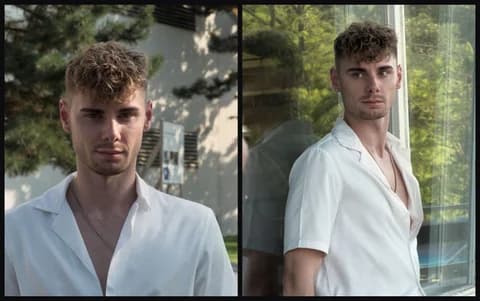
Our comparison was completed on 7 October 2026. The person is an adult model pictured in two Pexels-licensed stock photographs by Simon L. Schlee: photo 1 and photo 2. These are stock-photo references, not photographs of a participant we recruited or a customer. The small input thumbnail shows their composed grid; the original photographs are not republished here.
Every model received the same three real references in the identical order: composed grid, photo 1, photo 2. Each scene used the same exact English prompt, disclosed with the images, and 2K output. Dating used 3:4, business used 1:1 and social used 3:4. We used 3:4 for social because GPT Image 2.5 Sunburst and Seedream 5.0 Pro do not accept 4:5 via KIE.
There was a single attempt per slot. All nine outputs succeeded on the first attempt; there were no failures. Every first result is shown, with no rerenders or cherry-picking. We compared the completed portraits visually with the real references, looking at recognizable features, requested clothing, scene and composition. This is one person and one reference set, not a broad model benchmark.
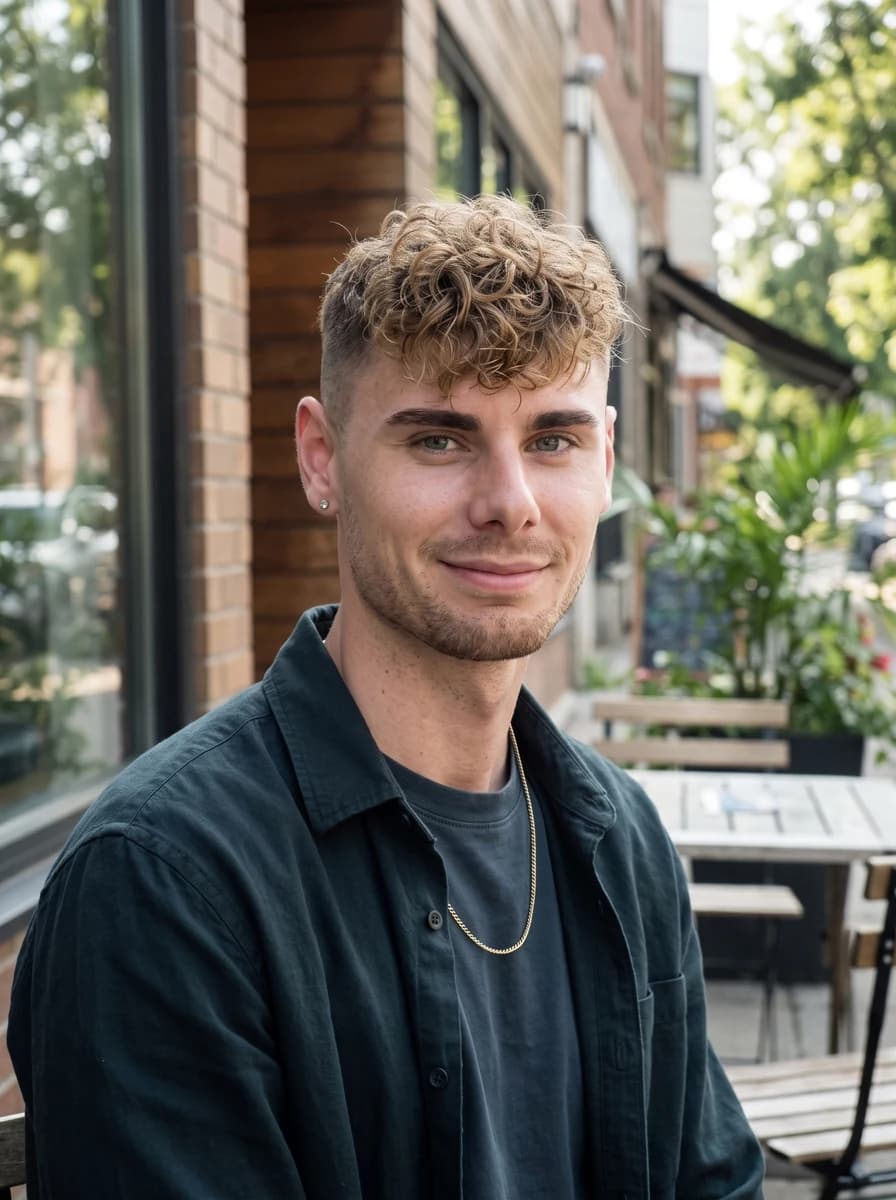
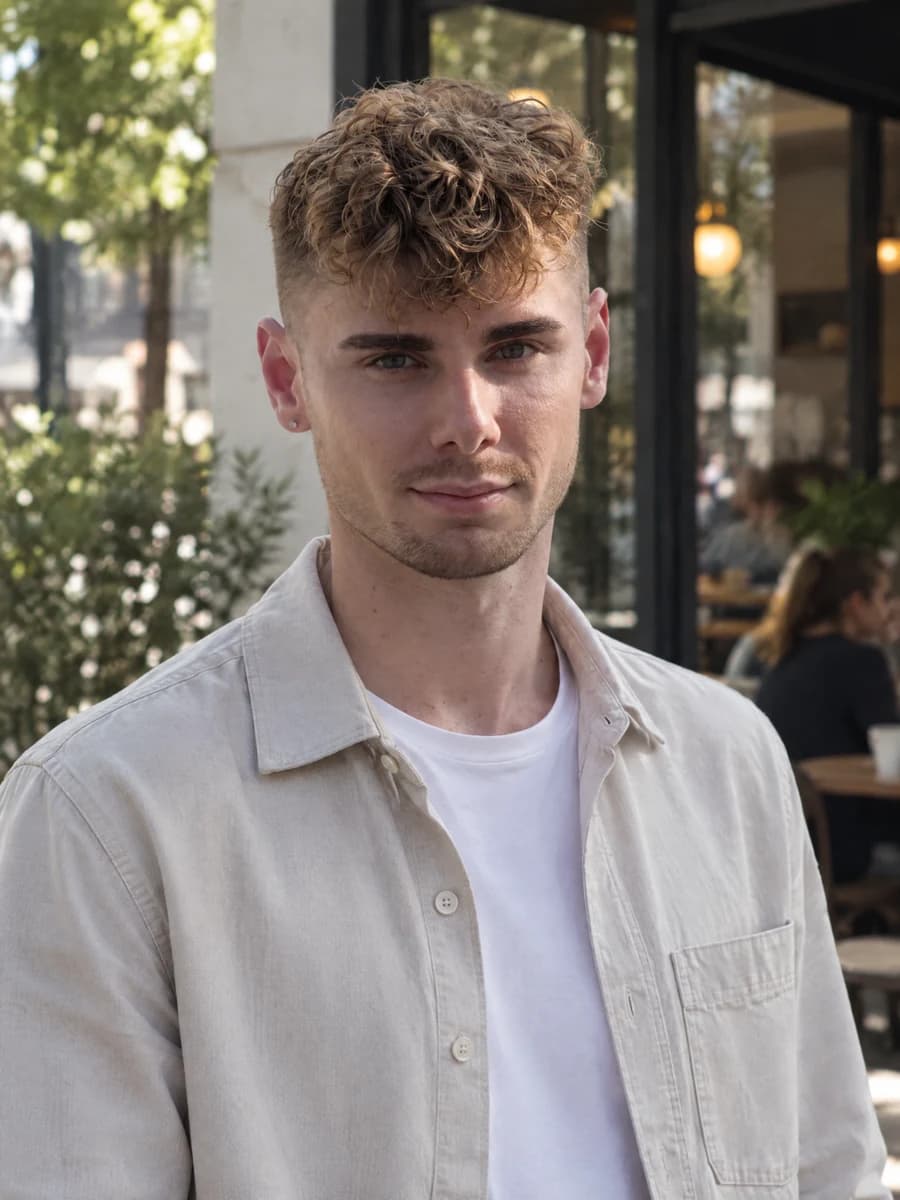
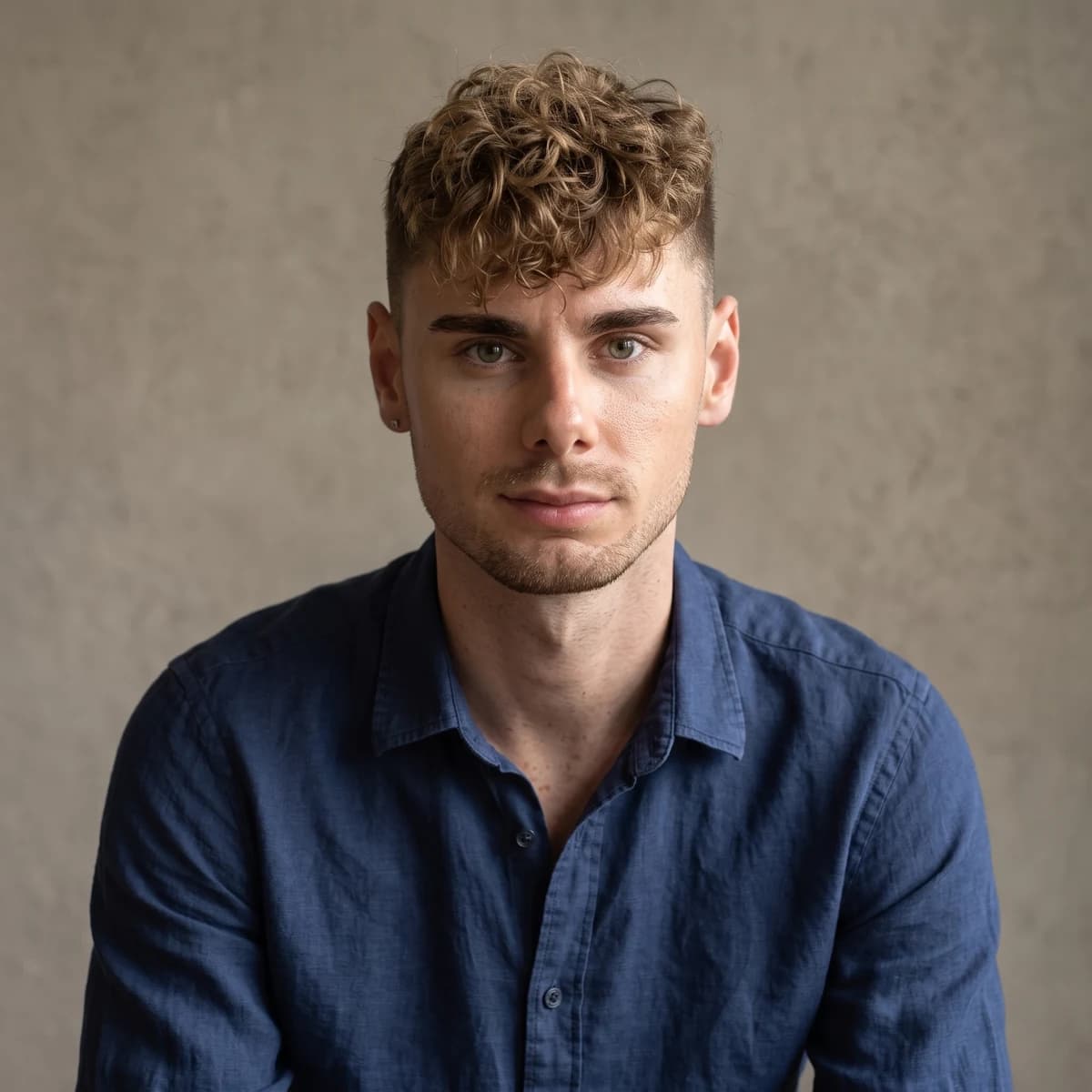
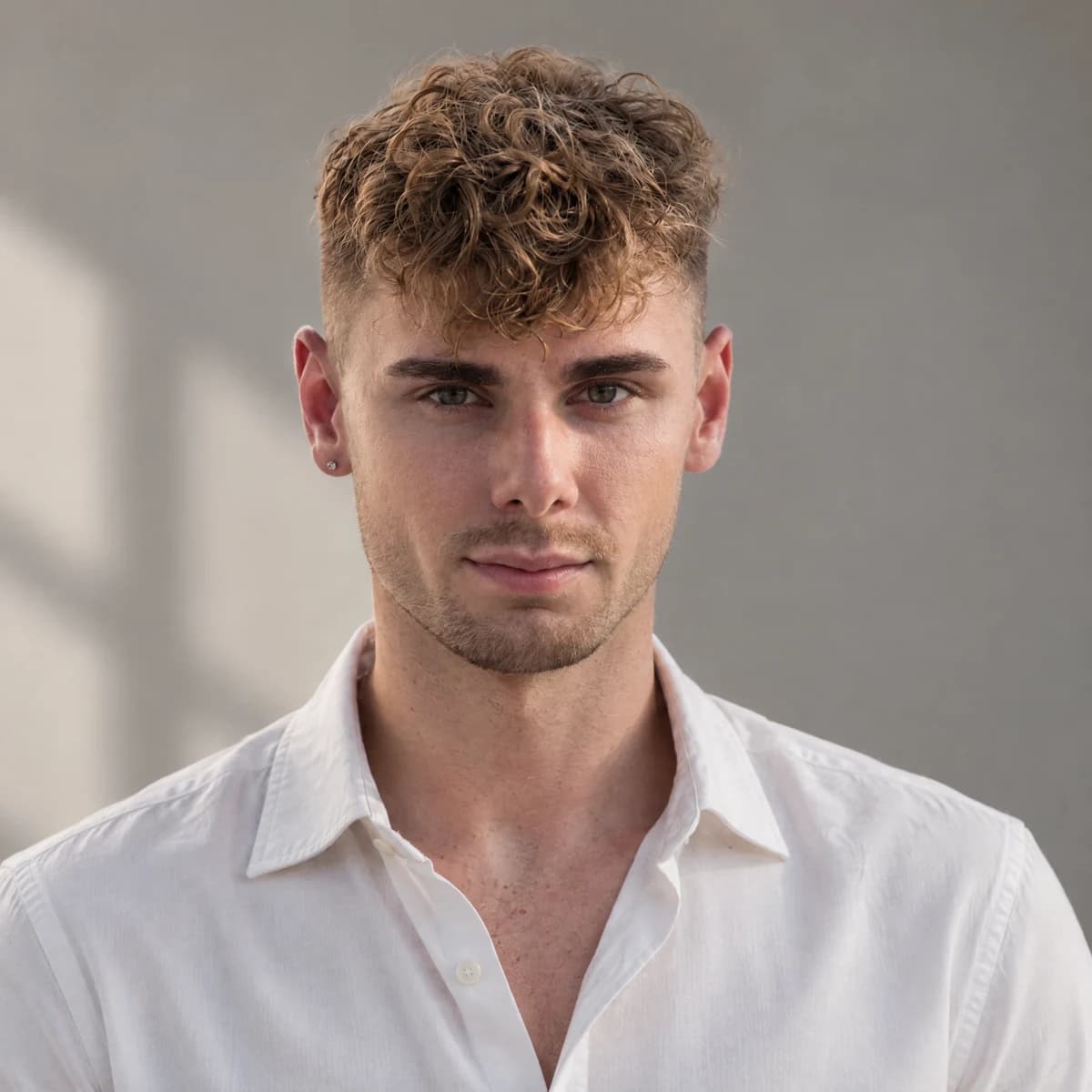
All three kept the identity well in this sample: the curly dirty-blond fringe, short faded sides, brows, light stubble and earring remain recognizable. That observation does not establish equal likeness for other faces, ages, skin tones or reference conditions. Keep the real source visible when making your own decision, even if the finished lighting looks convincing.
Nano Banana 2.1 followed the clothing and scene directions most literally here: a dark overshirt at the cafe, a navy shirt for the business portrait and flannel at the workspace. Expressions look natural and slightly warmer, and it kept the chain where it suited the scene. For this reference set, it was the clearest example of changing photographic context while following the wardrobe brief.
GPT Image 2.5 Sunburst gave the most photographed-looking lighting and clean composition in this sample. Clothing followed the brief: a light overshirt, a white shirt and a knit sweater. Its social image also added a hand-on-chin pose that the prompt did not request. Inspect pose as well as face: a polished composition can still introduce a detail outside the instruction.
Seedream 5.0 Pro preserved strong likeness but copied the reference outfit into all three scenes: the white open-collar shirt and gold chain. It largely ignored the requested overshirt, business-casual and familiar casual clothing. That makes it a useful option when you want the person as they already look in their photos. It is less persuasive in this sample when the concept requires different clothes.
Real comparison
One person, three models
The same three real references, the same English scene prompts and 2K output. Every image is the first and only attempt.
Reference photography: Simon L. Schlee · Pexels 27790620 · 27790623
Dating introduction
2K · 3:4Swipe to compare all three models. You can also focus this row and use the arrow keys.

Read the exact English comparison prompt
Use the adult person in the real reference photographs as the only identity source. Preserve their facial structure, current age, skin tone, hairline, hairstyle, body proportions and distinguishing features. Keep natural asymmetry and realistic skin texture. Create a natural chest-up profile photograph outside a neighbourhood cafe in soft daylight. Plain everyday overshirt, relaxed shoulders, visible eyes toward the camera and a small comfortable smile. Eye-level framing, ordinary background detail and room above the head. No beauty retouching, logos, readable signs or invented accessories.
Business headshot
2K · 1:1Swipe to compare all three models. You can also focus this row and use the arrow keys.
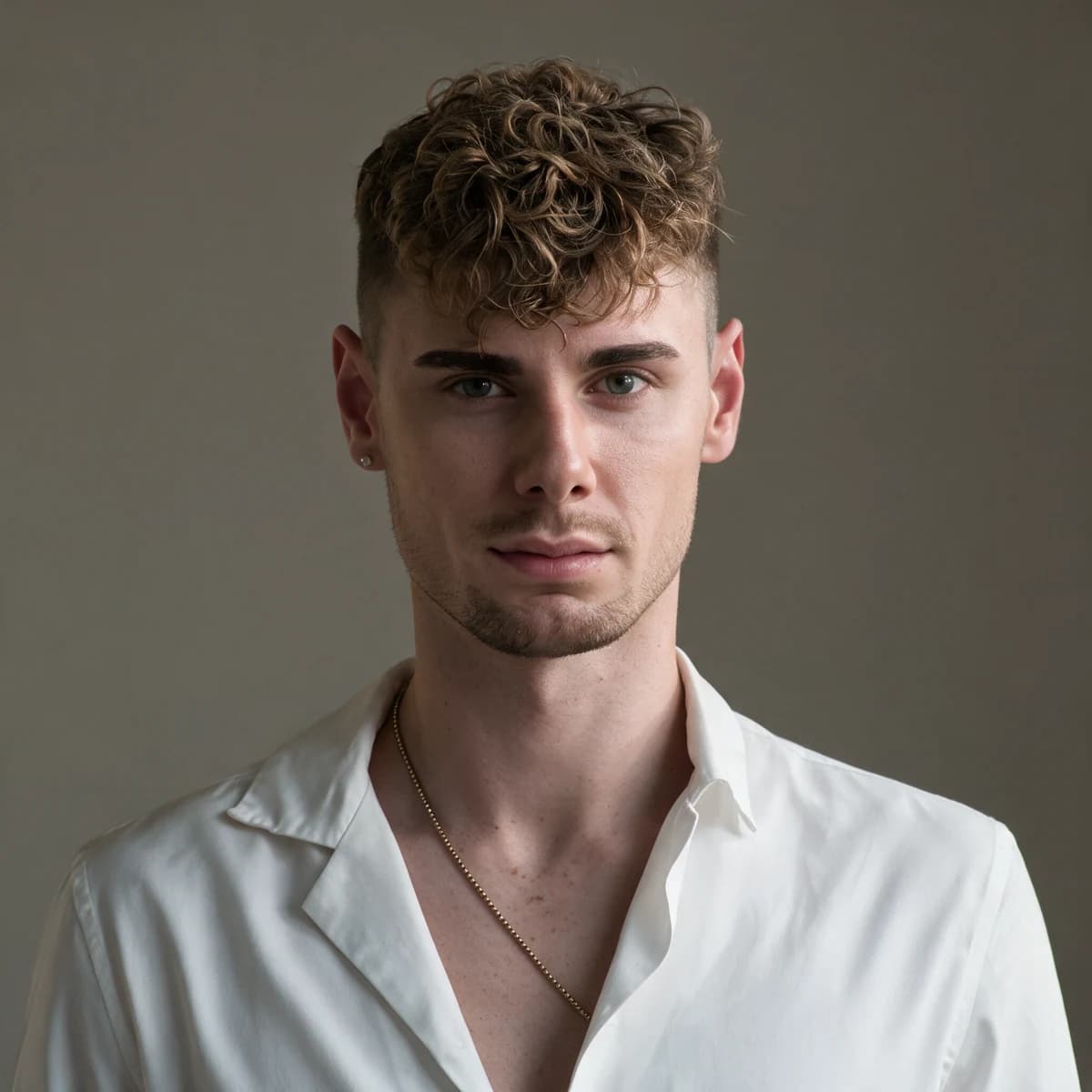
Read the exact English comparison prompt
Use the adult person in the real reference photographs as the only identity source. Preserve their facial structure, current age, skin tone, hairline, hairstyle, body proportions and distinguishing features. Keep natural asymmetry and realistic skin texture. Create a professional head-and-shoulders photograph against a plain warm-grey studio wall with soft window light. Simple business-casual clothing, relaxed upright posture, attentive expression and direct eye contact. Centre the face with room for square and circular crops. Keep glasses if present. No facial reshaping, company logos, invented credentials or text.
Social and personal brand
2K · 3:4Swipe to compare all three models. You can also focus this row and use the arrow keys.
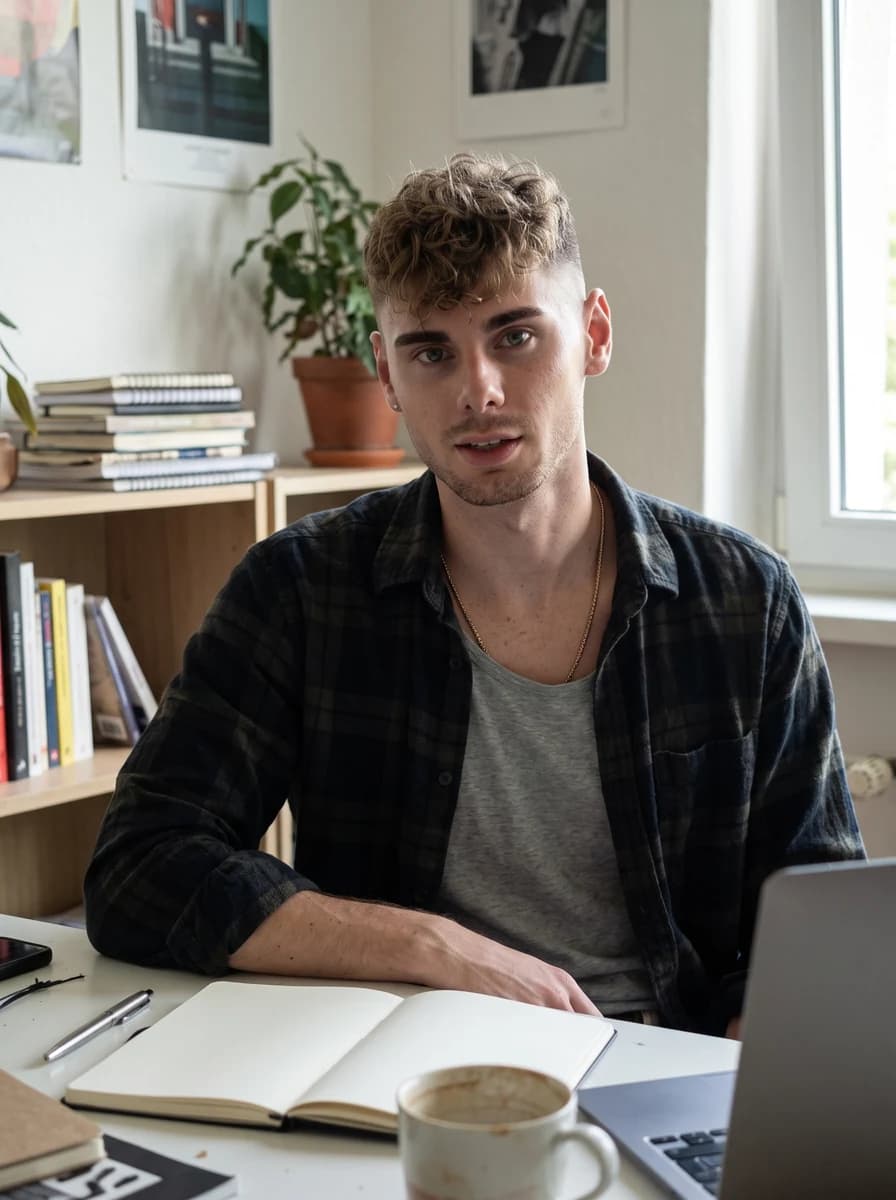
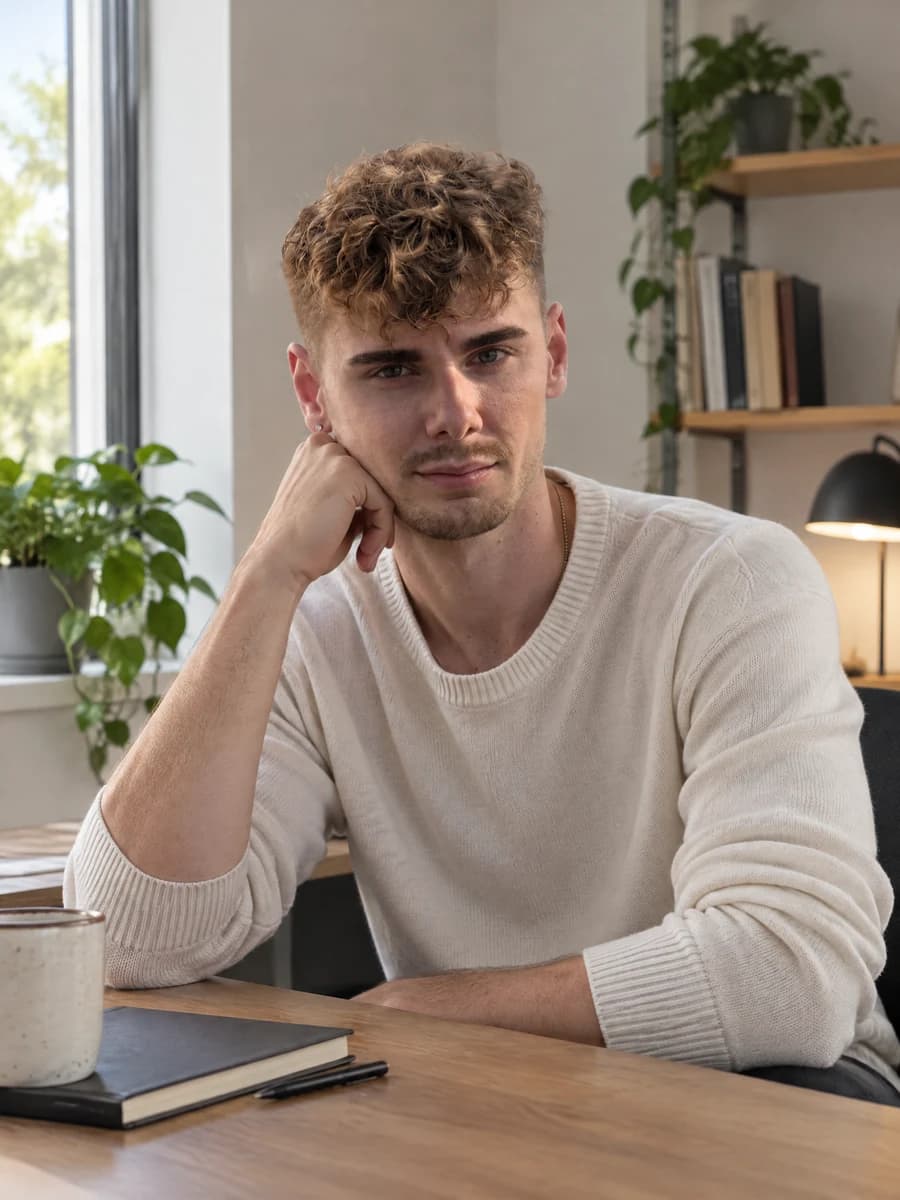
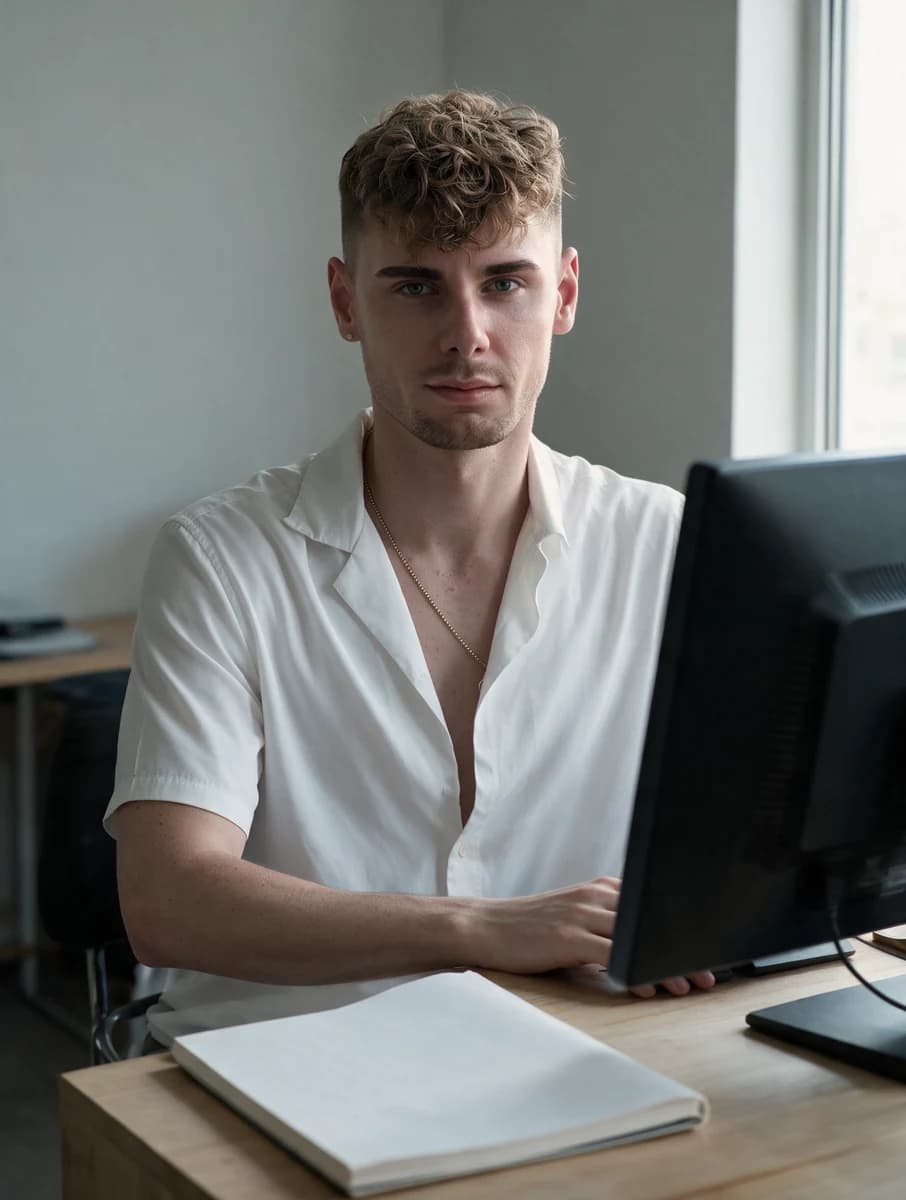
Read the exact English comparison prompt
Use the adult person in the real reference photographs as the only identity source. Preserve their facial structure, current age, skin tone, hairline, hairstyle, body proportions and distinguishing features. Keep natural asymmetry and realistic skin texture. Create a photographic portrait at a modest creative workspace. Familiar casual clothing, relaxed seated posture and an engaged expression toward the camera. Soft side-window light, simple desk and uncluttered background. Screens turned away, notebooks unlettered, room around the person for cropping. No brand logos, fabricated awards, luxury props, text or facial beautification.
One adult model, one reference set and one attempt per scene. This sample is not a benchmark or a promise about your likeness.
| Model | Observed in this sample | Practical implication |
|---|---|---|
| Nano Banana 2.1 | Wardrobe and scene followed closely | Useful when changing the clothing brief |
| GPT Image 2.5 Sunburst | Photographic light; an extra social pose | Review pose alongside composition |
| Seedream 5.0 Pro | Reference outfit repeated in every scene | Useful when keeping current appearance and clothes |
The companion Nano Banana 2.1 guide explains the Google workflow. Our Sunburst vs Flare article concerns an earlier, different sample. Read those observations within their own scope; this comparison does not establish a universal likeness or speed winner.
Review an edit without letting the identity drift
Before requesting an edit, write what should change and what should remain fixed. If the light is wrong but the person is right, target light. If the background distracts, target background. Rewriting the entire brief creates new opportunities for facial changes and gives you a less useful comparison with the previous image.
Check unchanged regions after every edit anyway. An instruction to preserve the face is a boundary you requested, not proof that the model respected it. Compare the nose, eye spacing, mouth and age cues against the real source. Check the silhouette and clothing too, especially when a new scene changes how shoulders, arms or hands are shown.
If an edit introduces a different person, return to real references rather than use the altered face as the next identity source. Keep a simple approval record: what changed, what failed and whether the original person remains recognizable. Stop when further attempts repeat the same identity problem. A clearer reference or simpler composition may be more useful than buying more rerenders.
Keep an editing request separate from a new scene request
Before asking for a local correction, identify whether the tool actually accepts an existing image for editing. A reference-based card render and a regional edit are different operations. If the interface only creates a new card image, a request to change a small background detail may still produce a new whole photograph. Plan the review accordingly. Do not assume the face is fixed simply because you described the change as local. The visible controls, not the model showcase, determine the workflow you can use.
When a tool does provide editing, save the accepted base before trying the correction. Describe the target area in plain language and state which nearby elements should stay intact. Avoid changing wardrobe, lighting and pose in the same request if only the background needs attention. Compare both the corrected area and the face after the edit. If the intended improvement introduces a new identity error, keep the earlier base and reconsider whether that small correction is worth another attempt.
Keep a simple distinction in your files between an approved portrait, a working edit and a rejected output. An attractive working image can otherwise be mistaken for the final version when you upload it later. Review a candidate at the intended crop after each meaningful correction, because a new background or shoulder position can alter the composition even when the facial features remain plausible. Prefer a straightforward final file that passes the actual profile job over a more elaborate version with an unresolved defect.
An unfinished generation is not an approved photograph. Wait for the complete file before judging fine detail, and treat a failed request as a workflow problem rather than a poor portrait sample. If you compare models, record failures separately instead of quietly removing them from your notes. That makes the eventual comparison explainable without mixing completion reliability with facial fidelity. This guide makes no measured claim about either. Your immediate decision remains practical: can the finished file represent you clearly in the destination where you need it?
Where The Ultimate Profile fits
We sell The Ultimate Profile, so this section describes our own product. Build an Identity Card from your real photographs, choose a photo set, then select the model for its cards. The grid is composed from real photos rather than AI re-synthesis. Owning a set permanently unlocks the card concepts; extra generations use UP Credits.
The new lineup includes Seedream 5.0 Pro alongside Nano Banana 2.1, the default, and GPT Image 2.5 Sunburst. The reference package is the real-photo grid plus at most six individual cells. Set purchases include a render per card; additional renders are priced separately. Selecting Seedream does not promise the annotation or layer-editing interface shown in ByteDance's model showcase.
The additional-render prices are 5, 8 and 12 UP Credits for Nano Banana 2.1 at 1K, 2K and 4K; 8, 13 and 20 for GPT Image 2.5 Sunburst at the same tiers; and 13 and 22 for Seedream 5.0 Pro at 1K and 2K. Pro has no 4K option in this registry. These are prices for the complete Identity Card reference package.
| Model | 1K | 2K | 4K |
|---|---|---|---|
| Nano Banana 2.1 | 5 | 8 | 12 |
| GPT Image 2.5 Sunburst | 8 | 13 | 20 |
| Seedream 5.0 Pro | 13 | 22 | Unavailable in this lineup |
These prices are UP Credits in our shop, not KIE credits or ByteDance API charges. Choose Boardroom for business concepts, a dating set for introductions or a social set for a more expressive series. You use the selected card workflow rather than paste these example prompts into an assumed free-text editor. Build your Identity Card from current photos and check the displayed model and price before confirming an additional render.
Choose a clear brief before choosing a premium label
Seedream 5.0 Pro is worth considering when you need reference-based portraits and a coherent photographic direction. Its name does not remove the need for current sources, explicit appearance boundaries and a review at the final crop. Reject identity drift even when the light and texture look convincing.
Start with the profile job you actually need. Build one believable introduction or headshot, then extend the visual direction to another context only when it helps. A useful series represents the same recognizable person across different photographic conditions. That is the standard to carry into every model choice, including Pro.