Can Nano Banana 2.1 make better profile photos in 2026?
Google's new image model brings better editing and reference handling. Here is how to use it for dating, business and social photos while keeping the person recognizable.
Nano Banana 2.1 can generate and edit profile photos from reference images. Google released it on 6 October 2026, with improvements to image quality and editing. The useful question for a dating photo or business headshot is narrower: does the finished person still look like you?
The Ultimate Profile team reviewed vendor documentation and inspected nine approved portrait renders for this guide. The comparison below uses licensed stock photographs of one adult model, with one attempt for each scene and model. It supplies observations about this sample, not a benchmark, an identity score or a promise about matches, reach or interviews.
What is Nano Banana 2.1, and what changed?
Nano Banana 2.1 is Google's image generation and editing model based on Gemini 3.6 Flash. It is different from Nano Banana Pro. Google's Nano Banana 2.1 model card documents that lineage and warns that character consistency can still fail. A product label that simply says Nano Banana is therefore not enough to identify which version you are using.
The Google developer specification lists 1K, 2K and 4K output and up to 14 reference images. It describes better instruction following, image quality and conversational editing. Those are model capabilities, not a promise that every app exposes every resolution, reference slot or editing control.
For a profile photo, better reference handling matters because one front-facing image cannot show everything about a person. A clear side view can clarify the nose and hairline; a full-body photo can clarify proportions. Supplying those views does not guarantee fidelity. It gives the model less missing information to invent, which is the reason to use references rather than rely on a text description of your appearance.
| Question | Documented answer | Practical implication |
|---|---|---|
| Which Google model? | Nano Banana 2.1, based on Gemini 3.6 Flash | Check the full model label |
| Output tiers? | 1K, 2K and 4K in Google's documentation | Choose the tier exposed by your app |
| Reference input? | Up to 14 images at model level | Curate useful views rather than duplicates |
| Guaranteed identity? | No; the model card lists consistency limits | Inspect your own face before publishing |
How we assess profile photos: four separate questions
This guide uses four categories: identity, photographic plausibility, context and delivery. They answer different questions. Identity asks whether it is you. Plausibility asks whether the light, body and surroundings make sense. Context asks whether the photo fits the role you want it to play. Delivery asks whether the crop and resolution survive the place where you publish it.
A portrait can succeed in one category and fail another. Beautiful lighting does not excuse a different jaw. A recognizable face does not excuse a misleading professional setting. Treat each category as a separate approval decision rather than add everything into an invented numerical score. This framework is an editorial checklist, not a measured model benchmark.
Start with identity. Compare eye spacing, eyebrow shape, nose width, hairline, age cues and familiar asymmetry against your current photos. Then inspect light direction, shoulders, clothing and visible hands. For context, ask what a stranger would assume about your life from the image. Finally, test the crop at the size people will actually see, not just the flattering full-screen preview.
| Category | What to inspect | Reject when |
|---|---|---|
| Identity | Facial structure, age, skin tone, distinguishing features | You look like a related but different person |
| Plausibility | Light, anatomy, fabric and background objects | The scene contains distracting visual errors |
| Context | Clothing, activity and implied setting | The photo suggests a life or role you cannot explain |
| Delivery | Face visibility, crop and export detail | The published thumbnail loses the useful expression |
Build a reference set that shows your current appearance
Use recent, clear photographs with ordinary light. Include a straightforward front view, an angled view and a full-body view when the requested photo needs body proportions. Choose pictures that agree about your current haircut, facial hair and glasses. A reference set spanning very different appearances asks the model to resolve a contradiction you could remove yourself.
Avoid filtered selfies and photos where sunglasses, a phone or heavy shadow obscure the features you want preserved. A close wide-angle selfie can also make the nose look larger than it appears at normal conversation distance. If every reference has the same distortion, adding more of them does not fix the information problem. A friend taking a simple eye-level photo is often a better next step than another elaborate prompt.
If you have a beard in one photo and none in another, state which is current or replace the outdated image. Do the same with hair colour, glasses and visible tattoos. Keep natural asymmetry. Asking for a symmetrical, younger or perfected face undermines a likeness brief even when the word realistic appears elsewhere in the prompt.
The reference and the output serve different jobs. The reference records what you currently look like; the output proposes a photograph. Keep a real reference open when reviewing the proposal. Repeatedly comparing new generations only with an earlier AI image can normalize small changes until a polished stranger starts to feel familiar. Our guide to face drift explains why recognizability needs its own review.
Nano Banana 2.1 dating photos: give each image a job
For a dating profile, begin with one clear introduction photo. A chest-up portrait in daylight, visible eyes and a comfortable expression gives the model a manageable brief. Save complicated movement, crowded venues and dramatic lighting for later. A first photo should let someone understand your face quickly, even when the app crops part of the background away.
A second image can show more of your body and clothing; another can show an activity you actually enjoy. These are different jobs, so do not create a row of near-identical headshots with different wallpaper. Equally, do not invent a mountain expedition or luxury hotel to compensate for a lack of variety. You need material you can talk about naturally, not an image you have to explain away on a date.
Copyable prompt: an approachable introduction
Adapt this example to your own real reference images, clothing and setting while keeping the identity instruction intact. The comparison below uses the exact English prompt disclosed with each scene; a translated or adapted example is a different instruction.
Create a natural chest-up profile photograph of the adult person in the reference images. Preserve their facial structure, current age, skin tone, hairline and natural asymmetry. They are standing outside a neighbourhood cafe in soft daylight, wearing a plain overshirt they could wear in everyday life. Relaxed shoulders, eyes toward the camera, a small comfortable smile. Eye-level framing, realistic skin texture and ordinary background detail. Leave room above the head for a portrait crop. No beauty retouching, logos, readable signs or invented accessories.
Review expression separately from attractiveness. An unusually broad smile can change the mouth and cheeks enough to weaken recognizability. If it fails, reduce the expression request before changing the scene. For a fuller set, use the same current references and vary one photographic job at a time. Our first dating photo guide covers selection; this article does not claim a model can predict who will match with you.
| Photo job | Suggested direction | Approval check |
|---|---|---|
| Introduction | Daylight, chest-up, relaxed eye contact | Face is recognizable at thumbnail size |
| Body context | Simple standing pose in familiar clothing | Proportions match your real reference |
| Conversation | An activity you genuinely enjoy | You can explain the implied scene honestly |
Nano Banana 2.1 headshots for LinkedIn and business
A business headshot asks for consistency more than novelty. Give the model a simple background, plausible work clothing and a readable expression. If you usually wear glasses, keep them. If your work is informal, a dark suit and a corporate tower may communicate the wrong thing even when the face is accurate. The right headshot represents the person a colleague will meet.
For Nano Banana 2.1 LinkedIn portraits, compose for a square image and a circular preview. Keep hair, chin and shoulders away from the extreme edges. A dramatic portrait with the face on the far side of the frame may make a strong editorial picture and a poor avatar. Do the small-size review before spending credits on a larger export.
Copyable prompt: a restrained professional headshot
Make the clothing instruction explicit. Professional does not automatically mean formal, and confident does not require an exaggerated jaw, a narrowed waist or an intense expression. You can ask for better photographic conditions while retaining the visible characteristics that make you recognizable.
Create a professional head-and-shoulders photograph of the adult person shown in the references. Keep their current age, facial proportions, hairstyle, skin tone, glasses if present and distinguishing features unchanged. Use a simple charcoal background and soft window light. Plain well-fitting business-casual clothing, relaxed posture and an attentive expression. Centre the face with space around the hair and chin for a square and circular crop. Natural skin texture, believable shadows, no facial reshaping, no company logos, no office name and no text.
Inspect the glasses bridge, collar and hair against the background. These small transitions can undermine an otherwise useful headshot. Do not let a polished backdrop imply an employer, credential or workplace you do not have. For the wider selection process, see the honest AI headshot guide. Nothing here promises a hiring benefit; the goal is a clear and current representation.
| Business use | Composition | Approval check |
|---|---|---|
| Profile avatar | Centred head and shoulders | Circular crop keeps the face intact |
| Team biography | Restrained portrait with simple background | Clothing and expression fit your actual role |
| Speaker page | Slightly wider portrait | No invented conference or employer cues |
Nano Banana 2.1 Instagram photos and personal brand
Social photos can carry more environment, colour and movement than a business avatar. For Nano Banana 2.1 Instagram images, specify the scene's purpose before its style. A casual city portrait, a working-at-a-desk picture and a creative biography image should not look like the same composition with three colour filters. Keep the activity believable and give the face enough light to remain identifiable.
A personal brand series needs a small visual brief. Decide on a wardrobe family, a lighting direction and a background mood, then reuse that direction alongside the real references. Consistency means someone recognizes you across the series. It does not require every image to use an identical facial expression or an expensive-looking setting.
Copyable prompt: a social portrait with breathing room
Choose a location type you can stand behind. You can use a generic quiet street or studio without asserting you attended a named event or travelled to a specific place. Leave some space around the subject so the image can work as both a portrait post and an avatar crop.
Photograph the adult person in the references in a quiet city street after light rain. Preserve their identity, current appearance and body proportions. They wear familiar casual clothing and stand naturally, looking toward the camera. Soft overcast light on the face, restrained reflections on the pavement, an uncluttered background and believable fabric texture. Compose a waist-up portrait with space around the subject for later cropping. Keep the image photographic rather than cinematic fantasy. No recognizable brands, landmark claims, text, facial beautification or exaggerated body shape.
For a creator biography, replace the street with a modest workspace and name only tools you actually use. Keep screens turned away or out of focus rather than ask the image model to invent a credible project interface. Add explanatory captions yourself after export. Improved text rendering does not make generated tiny lettering dependable, and a profile image rarely needs it in the first place.
| Social use | Visual direction | Approval check |
|---|---|---|
| Avatar | Clear face with simple surrounding space | Small crop still communicates the expression |
| Feed portrait | Environment supports the person | Scene looks plausible and contains no false claims |
| Personal brand | Repeat a wardrobe and lighting brief | Series stays recognizable without becoming repetitive |
Nano Banana 2.1 resolution: decide after the crop
The model's 1K, 2K and 4K labels describe output tiers. They do not mean every portrait has the same width and height, because aspect ratio affects dimensions. Nor does 4K correct facial drift. A larger image of the wrong person is still the wrong image. Confirm identity, expression and composition before deciding how much export detail you need.
Use a smaller tier to review a straightforward profile concept when it provides enough detail for the intended crop. Choose 2K when you need more room to crop or reuse the portrait in a larger biography layout. Consider 4K when a large final asset has a clear use. Avoid upgrading solely because the preview looks impressive on a large monitor; the reader may see a tiny avatar.
| Output tier | Editorial use suggestion | Check before paying |
|---|---|---|
| 1K | Initial concept or a modest profile crop | Enough visible facial detail for review |
| 2K | More cropping room or a larger biography image | The extra detail has a specific use |
| 4K | A deliberately large final asset | Composition and identity are already approved |
Nano Banana 2.1 vs GPT Image 2.5 and Seedream 5.0 Pro
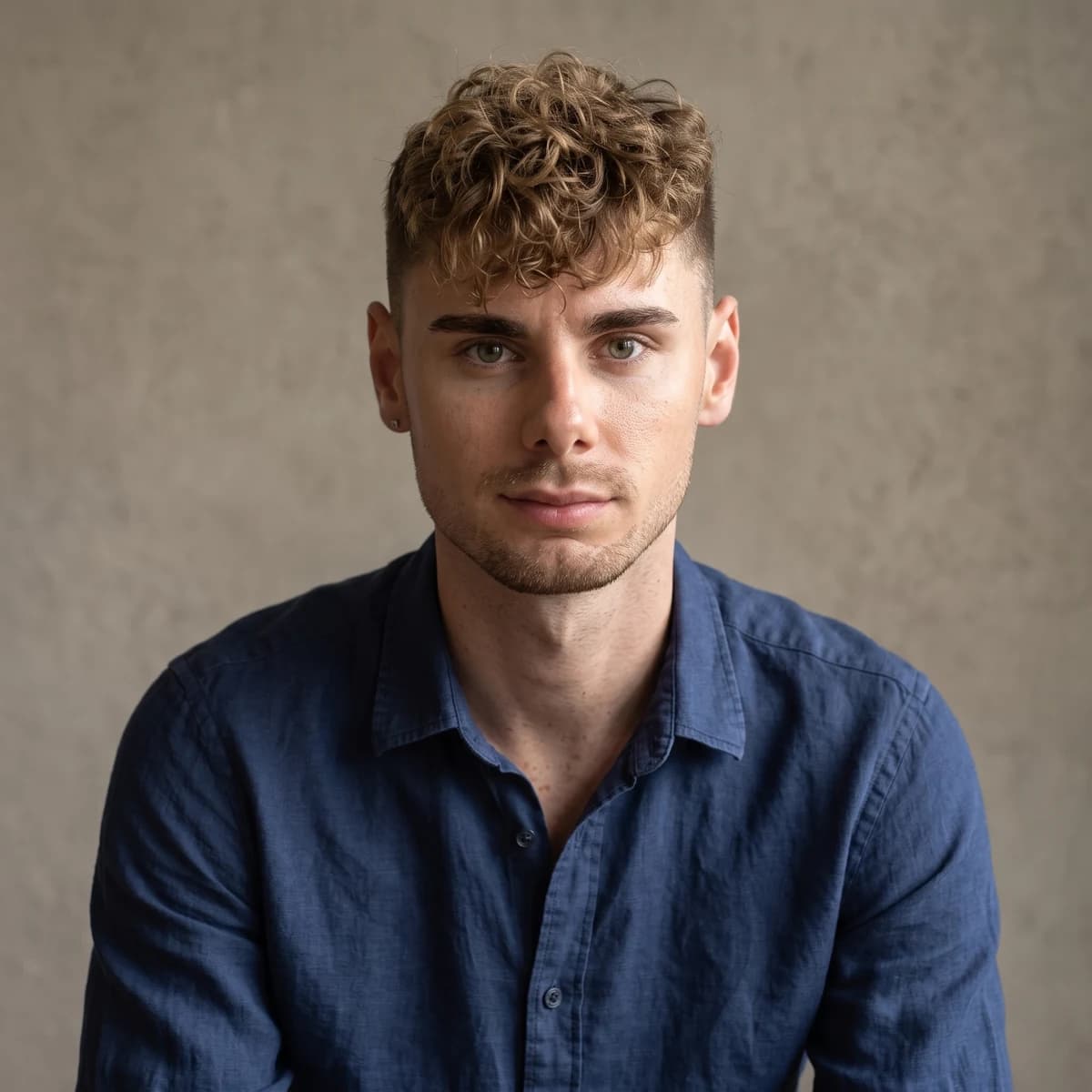
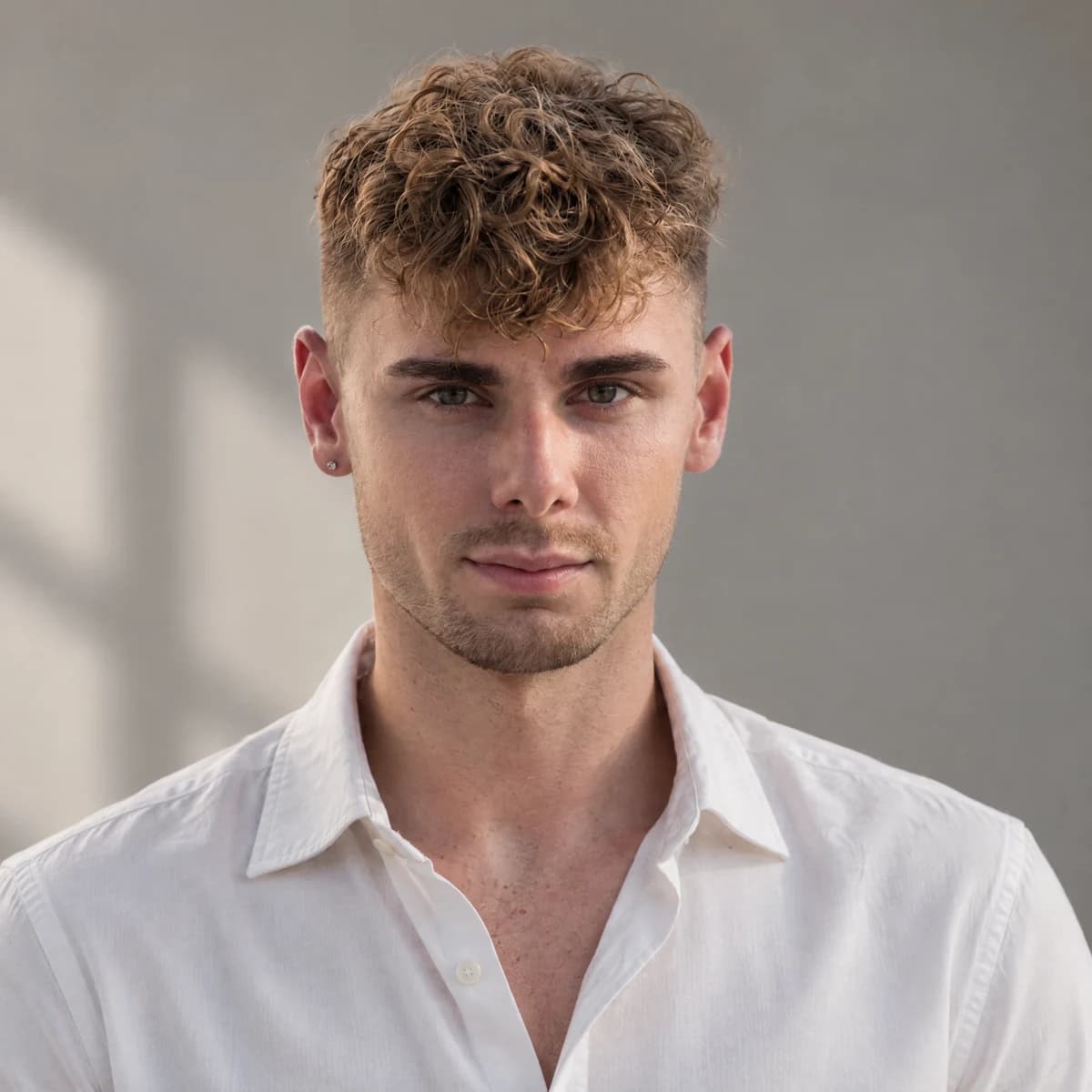
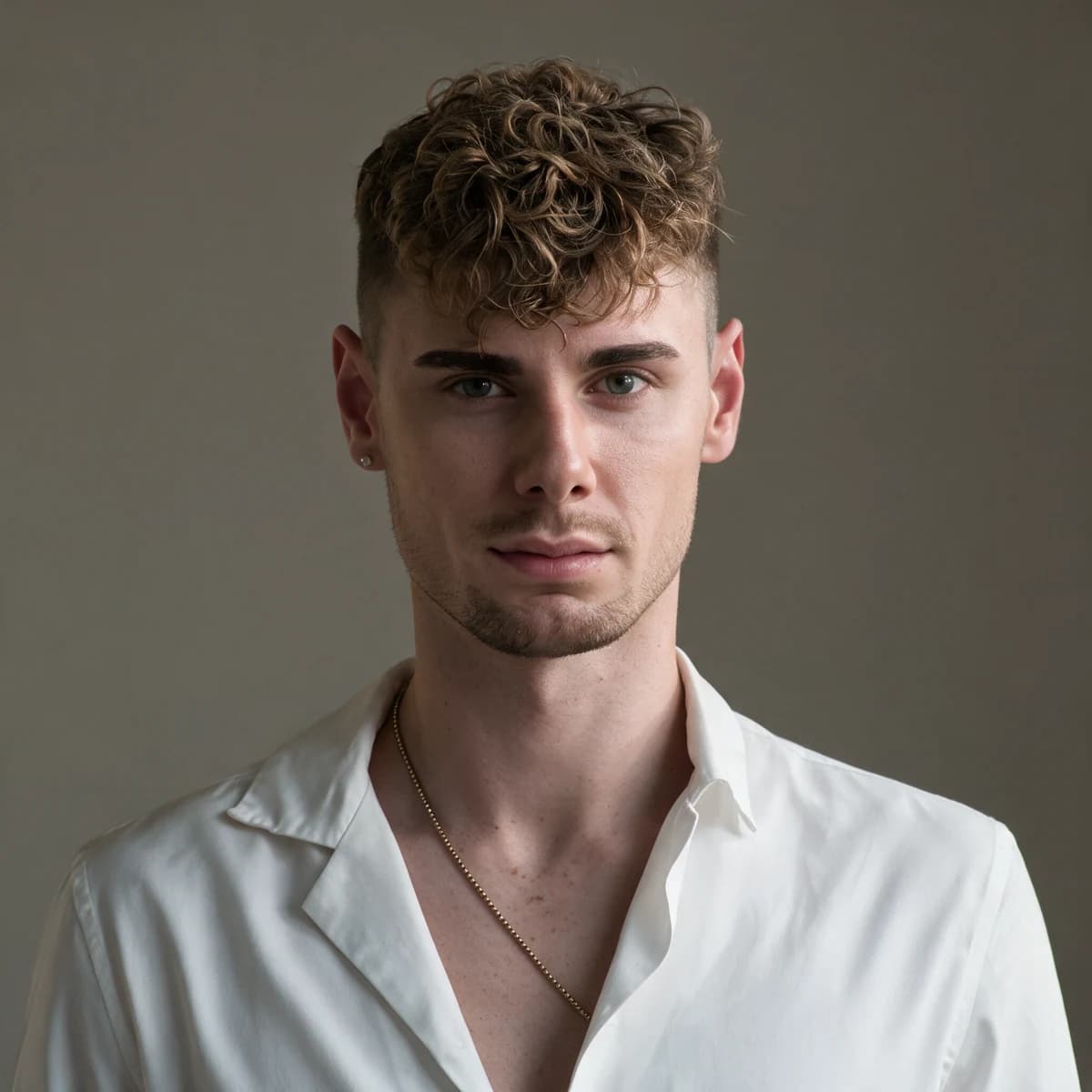
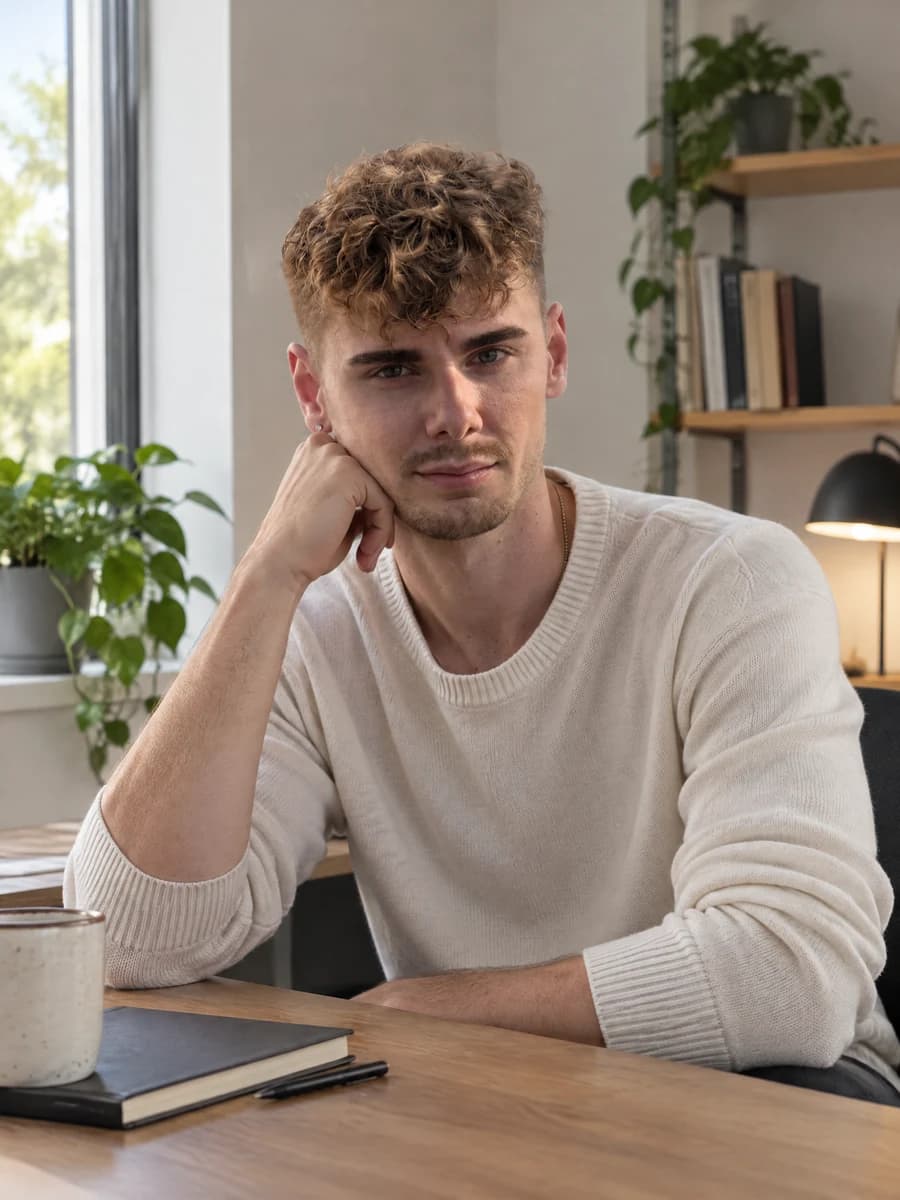
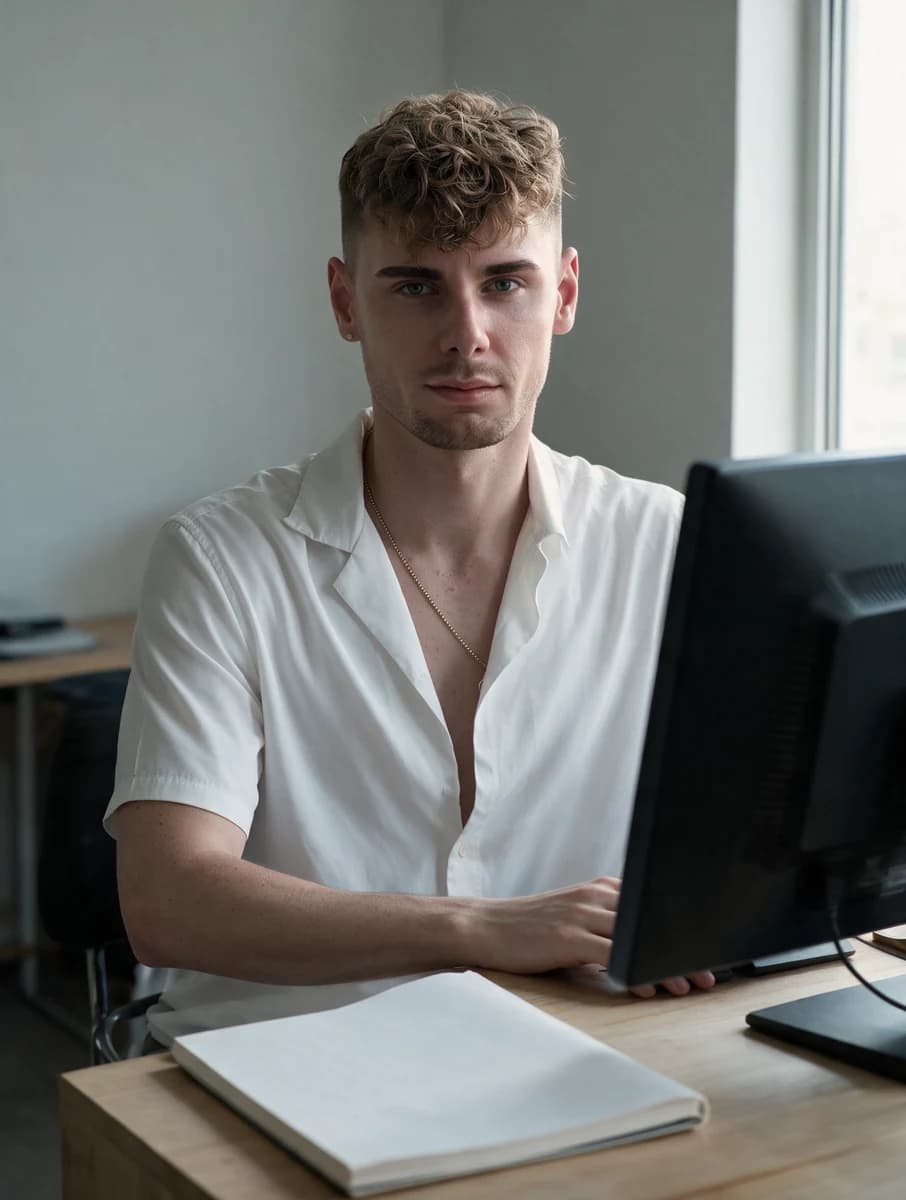
Our comparison was completed on 7 October 2026. The person is an adult model pictured in two Pexels-licensed stock photographs by Simon L. Schlee: photo 1 and photo 2. These are stock-photo references, not photographs of a participant we recruited or a customer. The small input thumbnail shows their composed grid; the original photographs are not republished here.
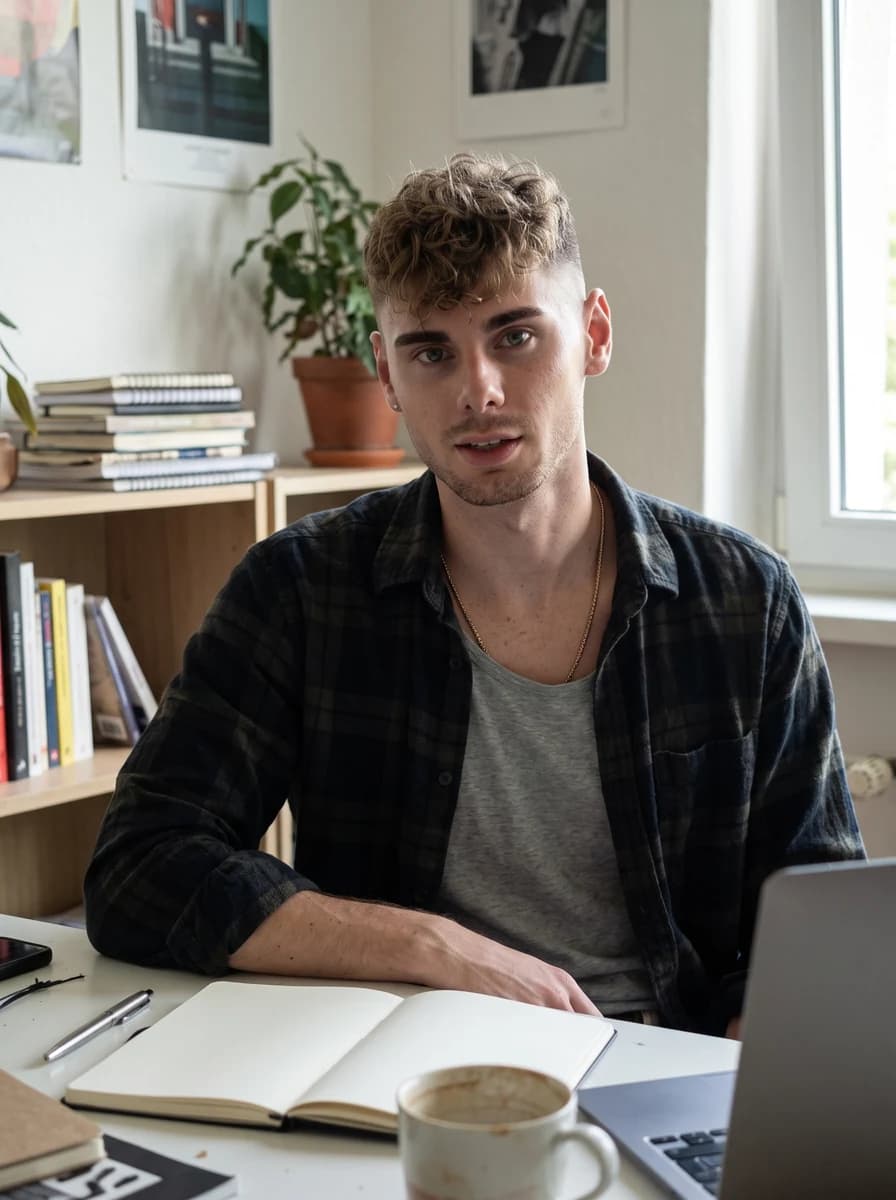
Every model received the same three real references in the identical order: composed grid, photo 1, photo 2. Each scene used the same exact English prompt, disclosed with the images, and 2K output. Dating used 3:4, business used 1:1 and social used 3:4. We used 3:4 for social because GPT Image 2.5 Sunburst and Seedream 5.0 Pro do not accept 4:5 via KIE.
There was a single attempt per slot. All nine outputs succeeded on the first attempt; there were no failures. Every first result is shown, with no rerenders or cherry-picking. We compared the completed portraits visually with the real references, looking at recognizable features, requested clothing, scene and composition. This is one person and one reference set, not a broad model benchmark.
All three kept the identity well in this sample: the curly dirty-blond fringe, short faded sides, brows, light stubble and earring remain recognizable. That observation does not establish equal likeness for other faces, ages, skin tones or reference conditions. Keep the real source visible when making your own decision, even if the finished lighting looks convincing.
Nano Banana 2.1 followed the clothing and scene directions most literally here: a dark overshirt at the cafe, a navy shirt for the business portrait and flannel at the workspace. Expressions look natural and slightly warmer, and it kept the chain where it suited the scene. For this reference set, it was the clearest example of changing photographic context while following the wardrobe brief.
GPT Image 2.5 Sunburst gave the most photographed-looking lighting and clean composition in this sample. Clothing followed the brief: a light overshirt, a white shirt and a knit sweater. Its social image also added a hand-on-chin pose that the prompt did not request. Inspect pose as well as face: a polished composition can still introduce a detail outside the instruction.
Seedream 5.0 Pro preserved strong likeness but copied the reference outfit into all three scenes: the white open-collar shirt and gold chain. It largely ignored the requested overshirt, business-casual and familiar casual clothing. That makes it a useful option when you want the person as they already look in their photos. It is less persuasive in this sample when the concept requires different clothes.
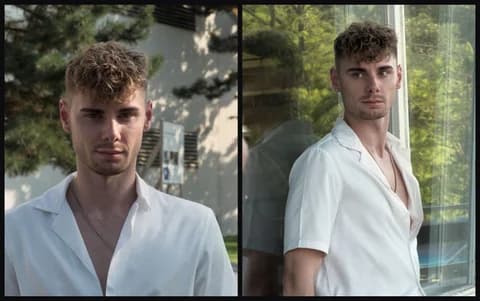
Real comparison
One person, three models
The same three real references, the same English scene prompts and 2K output. Every image is the first and only attempt.
Reference photography: Simon L. Schlee · Pexels 27790620 · 27790623
Dating introduction
2K · 3:4Swipe to compare all three models. You can also focus this row and use the arrow keys.
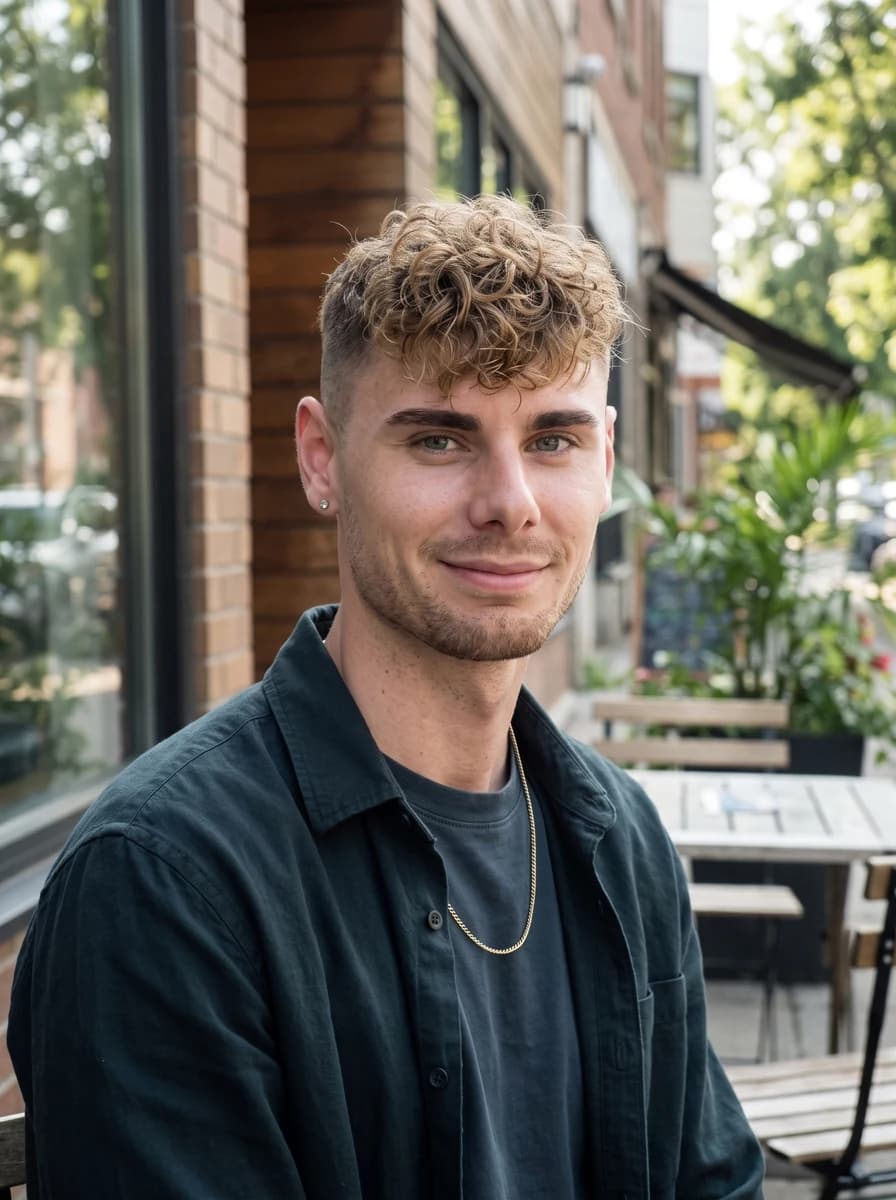
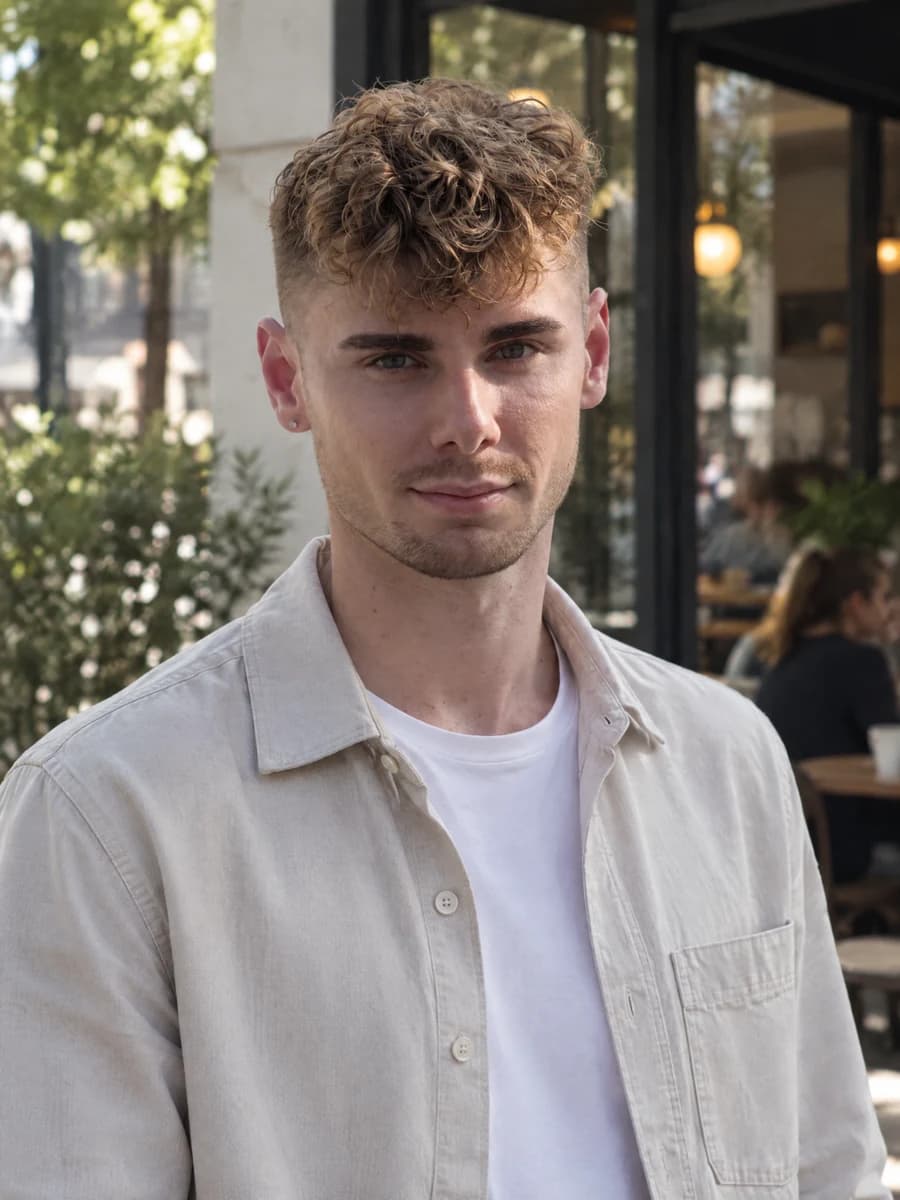
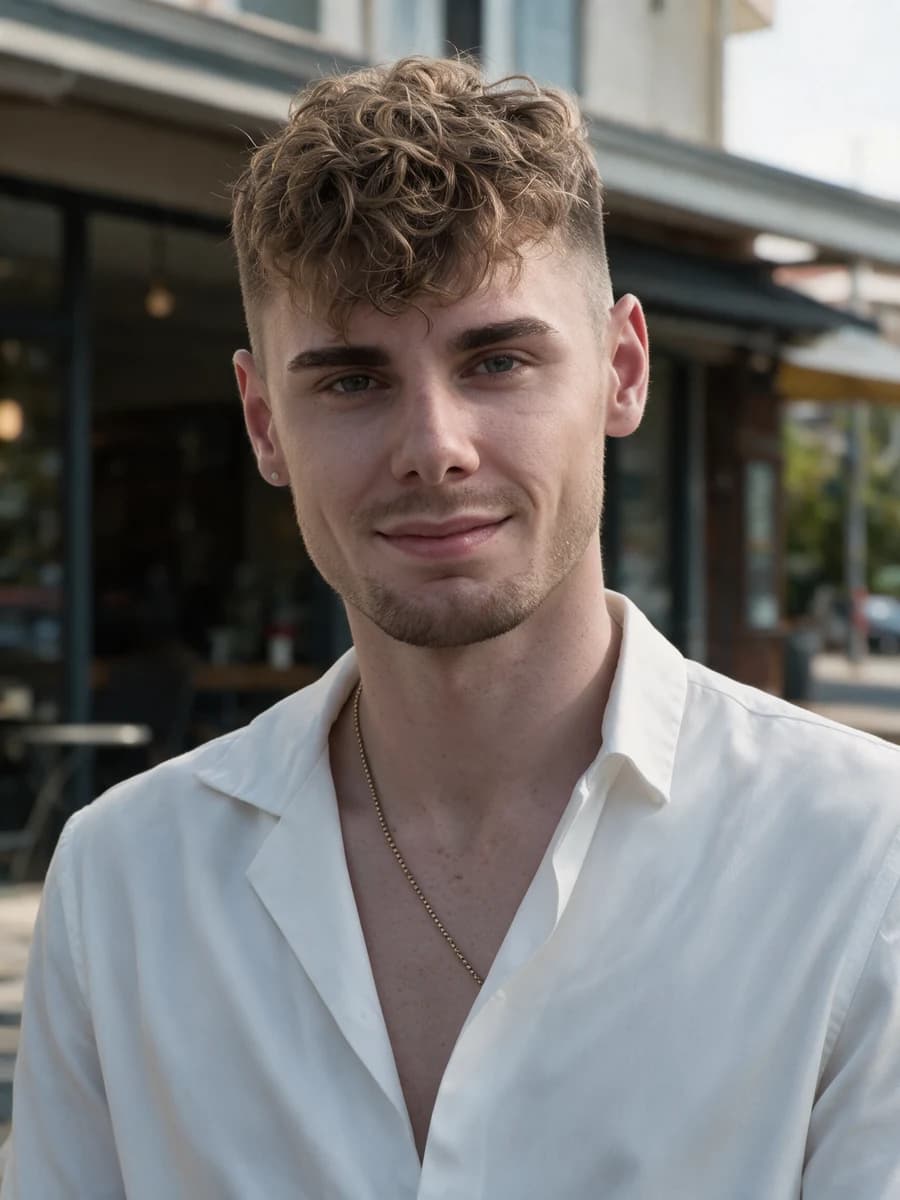
Read the exact English comparison prompt
Use the adult person in the real reference photographs as the only identity source. Preserve their facial structure, current age, skin tone, hairline, hairstyle, body proportions and distinguishing features. Keep natural asymmetry and realistic skin texture. Create a natural chest-up profile photograph outside a neighbourhood cafe in soft daylight. Plain everyday overshirt, relaxed shoulders, visible eyes toward the camera and a small comfortable smile. Eye-level framing, ordinary background detail and room above the head. No beauty retouching, logos, readable signs or invented accessories.
Business headshot
2K · 1:1Swipe to compare all three models. You can also focus this row and use the arrow keys.
Read the exact English comparison prompt
Use the adult person in the real reference photographs as the only identity source. Preserve their facial structure, current age, skin tone, hairline, hairstyle, body proportions and distinguishing features. Keep natural asymmetry and realistic skin texture. Create a professional head-and-shoulders photograph against a plain warm-grey studio wall with soft window light. Simple business-casual clothing, relaxed upright posture, attentive expression and direct eye contact. Centre the face with room for square and circular crops. Keep glasses if present. No facial reshaping, company logos, invented credentials or text.
Social and personal brand
2K · 3:4Swipe to compare all three models. You can also focus this row and use the arrow keys.
Read the exact English comparison prompt
Use the adult person in the real reference photographs as the only identity source. Preserve their facial structure, current age, skin tone, hairline, hairstyle, body proportions and distinguishing features. Keep natural asymmetry and realistic skin texture. Create a photographic portrait at a modest creative workspace. Familiar casual clothing, relaxed seated posture and an engaged expression toward the camera. Soft side-window light, simple desk and uncluttered background. Screens turned away, notebooks unlettered, room around the person for cropping. No brand logos, fabricated awards, luxury props, text or facial beautification.
One adult model, one reference set and one attempt per scene. This sample is not a benchmark or a promise about your likeness.
| Model | Observed in this sample | Practical implication |
|---|---|---|
| Nano Banana 2.1 | Wardrobe and scene followed closely | Useful when changing the clothing brief |
| GPT Image 2.5 Sunburst | Photographic light; an extra social pose | Review pose alongside composition |
| Seedream 5.0 Pro | Reference outfit repeated in every scene | Useful when keeping current appearance and clothes |
Our earlier GPT Image 2.5 portrait spot check concerns another sample. The companion Seedream 5.0 Pro guide explains its workflow. Neither article turns this small comparison into a universal ranking. Default selection and credit prices remain product decisions, separate from these observed images.
Fix the brief before buying repeated attempts
When a result fails, name the failure precisely. Wrong facial structure calls for checking the references and identity instruction. A face hidden in shadow calls for simpler light. An implausible hand calls for a simpler pose or less hand prominence. These are different corrections. Adding more adjectives such as premium, perfect and ultra-realistic rarely tells the model what to preserve or change.
Try one deliberate correction at a time and compare against the real source photos again. If a recognizability problem remains, stop iterating on that output as your new identity reference. Return to the original photographs or take a clearer current reference. Do not use a chain of AI portraits to repair an identity the chain has already shifted.
Set an attempt budget before starting. Approve a composition at an economical tier, then reserve any larger render for the candidate you actually intend to use. Keep a short note of what you changed and why you rejected an image. That record is more useful than remembering that one model felt better after a long session of changing instructions.
Keep the approved photograph useful after generation
Ask someone who knows you in everyday life to review the candidate beside a current real photograph. Give them a specific question: would they recognize this person without the profile name? Ask what looks different before telling them which version you prefer. This does not create a scientific likeness score, and a friend's approval is not a model benchmark. It can still expose a changed feature that you have stopped noticing after looking at many attractive generations. Keep the source visible so the discussion concerns your actual appearance rather than whether the proposed photograph looks polished.
Keep the approved full image and the final crop as separate files. A tight avatar crop may be useful for a business profile and unsuitable for a wider introduction. Start another crop from the full export rather than enlarging the small version or asking the model to reconstruct missing edges. After cropping, check the top of the head, the chin and any visible hands again. Do not apply an extra beauty filter at this stage: it can change the face you just approved. Minor layout decisions should not silently become another appearance-editing session.
Upload the candidate to the intended preview and check it before completing the change. Does the face remain clear? Is any useful body context lost? Does a circular mask hide hair or cut the chin? Compare the visible result with the existing profile image instead of judging only the downloaded file. If the preview changes the photograph's meaning, choose another crop or another candidate. A clear full-size portrait and a successful profile image are separate outcomes, and you can inspect the second without buying a further generation.
Keep a small record of the model, the scene direction and the reason you accepted the final file. If your appearance changes, return to fresh real photographs rather than treating an older generated portrait as your permanent identity. Likewise, remove a candidate from consideration when it implies a setting or activity you no longer want to suggest. The purpose of a profile library is to make an appropriate image easy to choose. It is not to preserve every impressive experiment or to make your actual appearance conform to whichever artificial portrait happened to look best.
Where The Ultimate Profile fits
We sell The Ultimate Profile, so this is our own product workflow. Your Identity Card is composed from your real photos; it is not an AI-generated replacement face. You then choose photo sets whose cards define different concepts, select a render model and use UP Credits for additional renders. Owning a set permanently unlocks its cards; ownership and generation are separate purchases.
Nano Banana 2.1 is the default in the new three-model lineup. An Identity Card render uses the composed reference grid first and at most six individual real-photo cells. Set purchases include a render per card; extra renders depend on model and resolution. The displayed price at confirmation governs your purchase, and a model's wider API capabilities do not imply additional editing tools in this shop.
The additional-render prices are 5, 8 and 12 UP Credits for Nano Banana 2.1 at 1K, 2K and 4K; 8, 13 and 20 for GPT Image 2.5 Sunburst at the same tiers; and 13 and 22 for Seedream 5.0 Pro at 1K and 2K. Pro has no 4K option in this registry. These are prices for the complete Identity Card reference package.
| Model | 1K | 2K | 4K |
|---|---|---|---|
| Nano Banana 2.1 | 5 | 8 | 12 |
| GPT Image 2.5 Sunburst | 8 | 13 | 20 |
| Seedream 5.0 Pro | 13 | 22 | Unavailable in this lineup |
These are The Ultimate Profile's credit prices, not Google's or KIE's billing units. Pick a dating set for introductions, Boardroom for business concepts or a social set for more expressive portraits. You do not need a developer account or an API key for that workflow. Start with your real photos, then review the likeness of each finished image before you decide to publish it.
Choose the photograph you can recognize and explain
Nano Banana 2.1 gives you a documented new option for generating and editing profile photographs. The decision still rests on current references, a useful photographic brief and an honest review of the output. Judge identity first, context second and export detail after the crop. Keep a rejected beautiful image rejected if the person is no longer you.
Start with one straightforward photo for the context you need today. A dating introduction, a professional avatar and a personal-brand portrait call for different compositions, but they should show the same person. Once that first image passes your own review, expand the series thoughtfully instead of collecting unrelated impressive scenes.