TrulyMadly Trust Score: Complete Guide to Maximum Verification
TrulyMadly's trust score is your key to better matches. This guide explains how to raise your trust rating through verifications and a complete, consistent profile.
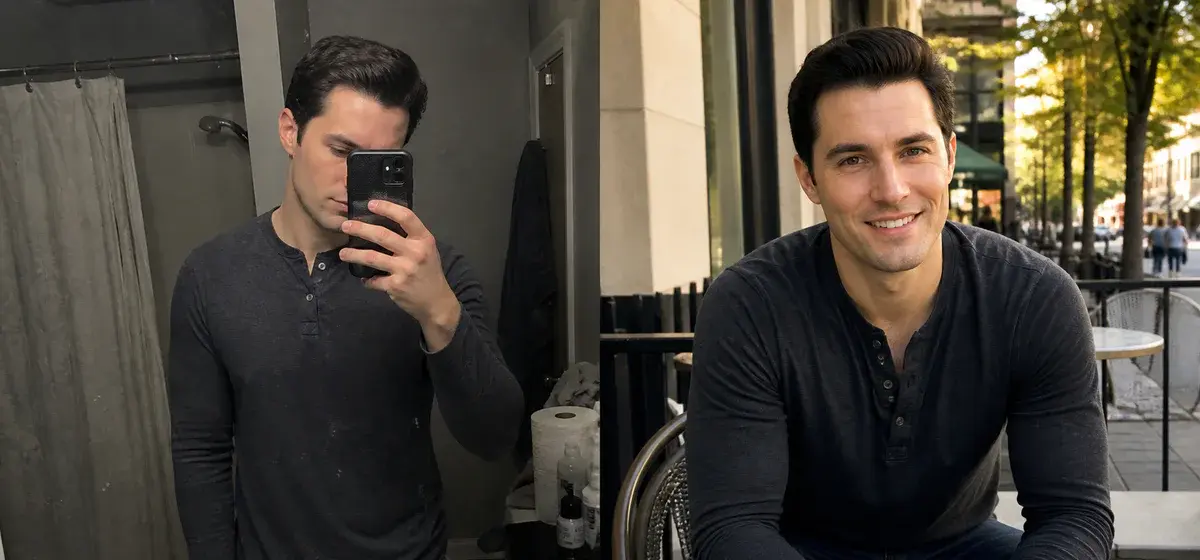
TrulyMadly's trust score isn't just a number - it shows other users how much of your profile has been verified on one of India's more serious dating platforms. TrulyMadly does not publish how the score affects visibility, but a well-verified profile is easier to trust, and many users look for it before they reply.
This guide explains how the trust system works, which steps raise your score and how to keep it high. Menus and exact steps change between app versions, so follow what your app shows.
Understanding the Trust Score System
What is TrulyMadly Trust Score?
The Basics:
- A verification-based rating shown as a percentage
- Combines several verification sources
- Rises as you complete more verifications
- Updates when you add or remove verifications
- Visible to other users on your profile
Why Trust Score Matters:
- Visibility: a complete, verified profile gives people fewer reasons to skip you
- Credibility: users can see at a glance that you are who you say you are
- Match Quality: serious users tend to prefer verified profiles
- Safety: verification reduces catfishing and fake profiles
- Conversation Rate: people are more comfortable replying to a profile they trust
How to Read the Score
Rough Guide (our interpretation, not official TrulyMadly bands):
- Low: little verified, easy for others to doubt
- Medium: basics verified, room to grow
- High: most verifications done, a credible profile
- Very high: every available verification completed
Trust Score Components
1. Phone Verification
Impact: Essential baseline verification
How to Complete:
- Open the verification section of your profile
- Select phone verification
- Enter your active mobile number
- Receive the OTP via SMS
- Enter the OTP to complete
Pro Tips:
- Use your primary, personal mobile number
- Keep the same number for profile consistency
- Enable extra account security where offered
- Usually completes within moments
2. Facebook Verification
Impact: A strong trust signal and social proof
What Helps:
- An established, genuinely used Facebook account
- A real network of friends
- Some regular activity
- The same name as on your TrulyMadly profile
How to Complete:
- Go to the verification section
- Select "Connect Facebook"
- Authorize TrulyMadly access
- Allow basic profile information
- Verification completes automatically
What a Connected Account Can Show:
- That the account is real and established
- That your name is consistent
- That you have a genuine social network
Privacy:
- Check the permissions screen to see exactly what is shared
- Dating apps typically do not post on your behalf; confirm in the permissions
- Review TrulyMadly's privacy policy if you are unsure
- Disconnecting usually removes that verification from your score
3. LinkedIn Verification
Impact: Professional credibility, education and work details
What Helps:
- An active LinkedIn profile
- Complete professional information
- Current job listed
- Education details filled
- A clear profile photo
How to Complete:
- Open the verification section and choose LinkedIn
- Log in to LinkedIn
- Authorize TrulyMadly
- Allow access to your basic profile
- Verification completes
Why LinkedIn Matters:
- Many marriage-minded users care about education and profession
- Shows career seriousness
- Backs up your professional claims
- Adds credibility
- Appreciated by marriage-minded users
4. Photo Verification
Impact: One of the strongest trust signals and an anti-catfish measure
How It Usually Works:
- The app prompts you for a live selfie
- Follow the on-screen instructions
- Take a selfie that matches your profile photos
- The app checks the face match
- A verified badge appears on your profile once approved
Requirements for Success:
- Good lighting (natural light best)
- Face clearly visible
- No sunglasses or masks
- Match your main profile photo
- Current appearance (no drastic changes)
Common Rejection Reasons:
- Face doesn't match profile photos
- Poor lighting or blurry image
- Face partially obscured
- Outdated profile photos (verification won't match)
- Wearing accessories not in profile photos
Pro Tips:
- Complete during daytime (better lighting)
- Remove sunglasses/hat for verification
- Face camera directly
- Neutral expression similar to profile
- Retry if rejected; a second attempt in better light often works
5. Email Verification
Impact: Basic verification and account security, where offered
How to Complete:
- Open your account settings
- Enter your email address
- Receive the verification email
- Click the verification link
- Confirmation appears in the app
Best Practices:
- Use a permanent personal email (not a temporary one)
- Use an address you check regularly
- Useful for password recovery
- Takes only a few minutes
6. Profile Completeness
Impact: Shows serious intentions
Elements Worth Completing:
- Bio: a few honest, specific sentences
- Photos: 5+ clear, recent images
- Basic Info: Height, education, profession
- Lifestyle: Drinking, smoking, diet preferences
- Interests: 5+ selected
- About You: Detailed description
Completion Checklist:
- ☐ 5-7 photos uploaded
- ☐ Bio written (150-250 characters)
- ☐ Height entered
- ☐ Body type selected
- ☐ Education level detailed
- ☐ Profession specified
- ☐ Company/institution named
- ☐ Religion indicated (if relevant)
- ☐ Mother tongue selected
- ☐ Drinking preference set
- ☐ Smoking status stated
- ☐ Diet preference selected
- ☐ 5+ interests chosen
- ☐ About section completed
7. Activity and Responsiveness
Habits That Signal a Real, Engaged User:
- Regular activity: log in often enough that your profile stays current
- Responsiveness: reply to messages instead of leaving them open
- Interests: complete any interest or personality questions offered
- Consistency: keep your details stable over time
- Badges: some app versions show badges; check what yours offers
Trust Score Optimization Strategy
Quick Start: The Basics in About 30 Minutes
Immediate Actions:
- Phone Verification (5 minutes)
- Email Verification (5 minutes)
- Upload 5 Photos (10 minutes)
- Complete Bio (5 minutes)
- Fill Basic Info (5 minutes)
Result: a solid base and a profile that looks cared for
Phase 2: Social Verification in About an Hour
Next Steps:
- Facebook Verification (10 minutes)
- Complete All Profile Sections (20 minutes)
- Select Your Interests (5 minutes)
- Add a Detailed About Section (15 minutes)
Result: a noticeably higher score and more credibility
Phase 3: Every Verification Done
Advanced Verifications:
- LinkedIn Verification (10 minutes)
- Photo Verification (5 minutes)
- Consistent Activity (ongoing)
- Premium Membership (optional; check in the app whether it affects your score at all)
Result: the highest score you can reach and the most credible profile
Trust Score Maintenance
Keeping Your Score High
Do This:
- Log in regularly
- Respond to messages within 24 hours
- Keep profile information updated
- Maintain photo quality and recency
- Verify after any profile changes
- Re-verify if score drops unexpectedly
Avoid This:
- Changing basic info frequently (looks suspicious)
- Ignoring messages
- Outdated photos (verification mismatch)
- Disconnecting verified accounts
- Incomplete profile sections
- Spam behavior or inappropriate content
Why Trust Scores Drop
Possible Causes (TrulyMadly does not publish the exact rules):
- Disconnecting Facebook/LinkedIn
- Changing name or basic info
- Updating photos drastically (verification mismatch)
- Possibly, long periods of inactivity
- Possibly, reports from other users
- Incomplete profile sections
Trust Score Impact on Dating Success
Visibility
TrulyMadly does not publish how its matching or ranking algorithm weighs the trust score against activity, profile completeness or engagement. Any precise percentages you see online are guesses. What is reasonable to expect:
- Trust Score: shows others how much of your profile is verified
- Activity: active profiles are more likely to be seen and answered
- Profile Completeness: gives people more reasons to like you
- User Engagement: good conversations come from good first impressions
Match Quality
What to Expect:
- Verified users often prefer other verified users
- A trusted profile makes it easier for someone to send the first message
- People reply more readily when they are not worried about a fake profile
- Serious users may use trust as a filter where the app allows it
Advanced Trust Optimization
Photo Verification Strategy
Maximizing Photo Verification Success:
- Update main photo first (recent, clear face)
- Ensure consistency (similar appearance across photos)
- Complete during golden hour (best natural lighting)
- Remove obstructions (glasses, hats for verification)
- Neutral expression (matches profile photos better)
LinkedIn Optimization
Before Connecting LinkedIn:
- Update LinkedIn profile completely
- Add professional photo
- List current job and company
- Detail education credentials
- Add 3+ skills
- Ensure name consistency with TrulyMadly
Facebook Enhancement
Optimize Facebook Before Verification:
- Use your real, established account
- Add a profile photo
- Check that your basic info is accurate
- Show some genuine activity
- Consistent name with dating profile
Trust Score Myths vs Reality
Common Misconceptions
MYTH: Premium membership automatically gives a full trust score
REALITY: Verifications are what build trust; paying does not verify who you are
MYTH: You need all verifications for matches
REALITY: You can match without them, but each verification makes your profile easier to trust
MYTH: Trust score doesn't matter if photos are good
REALITY: Great photos plus verification is more convincing than either alone
MYTH: Once achieved, trust score stays permanently
REALITY: It can drop if you disconnect verifications or change key details
MYTH: Photo verification is optional
REALITY: Technically yes, but it is one of the clearest signals that you are real
Trust Score FAQs
Common Questions
Q: Can I reach 100% trust score?
A: Possibly, if you complete every verification your app version offers. A high score with the key verifications done is what matters most.
Q: How long does verification take?
A: Phone/email: usually within moments. Facebook/LinkedIn: a few minutes. Photo: usually quick if the selfie matches.
Q: What if photo verification keeps failing?
A: Update main photo to very recent selfie, try in good natural lighting, remove accessories, ensure clear face visibility.
Q: Can I disconnect Facebook after verification?
A: Usually yes, but you will likely lose that part of your score. Better to keep connected if you are comfortable with it.
Q: Does trust score reset?
A: Not on its own, but it can decrease when verifications are removed or profile details become inconsistent.
Conclusion: Your Trust Score Action Plan
Week 1: Foundation
- ☐ Complete phone verification
- ☐ Verify email address
- ☐ Upload 5-7 quality photos
- ☐ Write 150-250 character bio
- ☐ Fill all basic information
Week 2: Growth
- ☐ Connect Facebook account
- ☐ Complete all profile sections
- ☐ Select your interests
- ☐ Add detailed About section
- ☐ Log in regularly
Week 3: Full Verification
- ☐ Connect LinkedIn profile
- ☐ Complete photo verification
- ☐ Reply to messages promptly
- ☐ Keep your details consistent
- ☐ Consider premium membership only for its features
Why It Pays Off
Benefits of a Highly Verified Profile:
- Fewer doubts about whether you are real
- More serious, like-minded matches
- Easier first conversations
- A profile that stands out as credible
- Connection with other verified users
- Better odds of turning matches into dates
Ready to Maximize Your Trust Score?
The Ultimate Profile's photo optimization helps your profile photos look natural and still like you, so they stay consistent with your verification selfie while you look your best.
Optimize Your TrulyMadly Photos with The Ultimate Profile - Trust score friendly, verification ready, match optimized.